Order a demo

Blog

  • All
  • E-book
  • News
  • Success stories
  • Releases
6 min read
smart crm en
How to Calculate ROI for Your Business CRM System

How can you tell whether your CRM is truly delivering the results your business expects? What exactly should you analyze: sales, team productivity, automation, or customer retention? And most importantly, how do you calculate the effectiveness of the system in a way that provides a realistic picture rather than just a favorable percentage in a report? 

To answer these questions, companies analyze CRM ROI (Return on Investment).

What is CRM ROI?

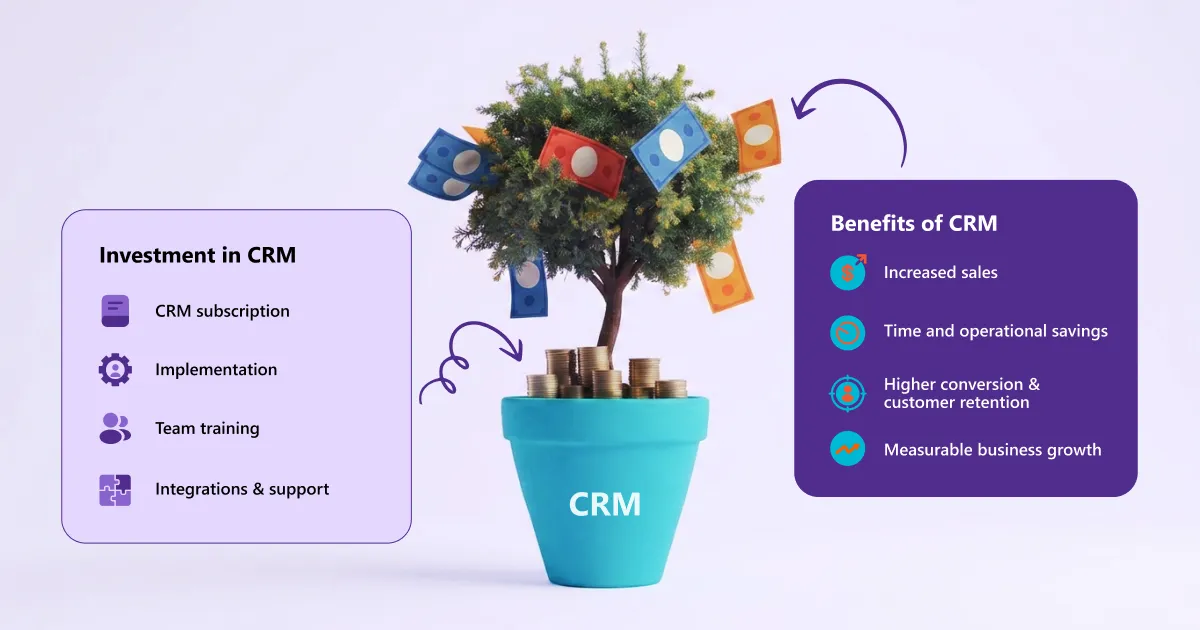
CRM ROI is a metric that measures the relationship between the business value generated by a CRM system and the total corporate costs associated with it. While additional revenue is the primary consideration, a meaningful CRM ROI calculation should also take a number of contextual factors into account.

CRM ROI is not determined solely by how actively the system is used. What matters is its effectiveness: reducing operating costs, increasing team productivity, accelerating lead processing, improving customer service, and successfully retaining customers. According to industry statistics, companies generate an average of $8.71 for every $1 invested in CRM.

Why is it important to measure CRM ROI?

In many companies, CRM ROI is used as a key indicator for evaluating implementation effectiveness, justifying budgets, and making decisions about further investment in the system.

Regular analysis of CRM ROI enables businesses to:

  • evaluate the effectiveness of CRM implementation
  • understand which processes deliver the greatest impact
  • identify weaknesses in sales or management processes
  • justify budgets for system maintenance or further development
  • make more informed business decisions

Formula for calculating CRM ROI

ROI is most commonly calculated using the following formula: ROI = (Benefits − Costs) / Costs × 100%

Where:

  • Benefits — the total revenue generated as a result of using the CRM system
  • Costs — all financial investments associated with the system

However, it is important to remember that the formula itself is only the framework of a broader analysis. To accurately assess CRM ROI, it is essential to correctly identify both benefits and costs.

What's included in CRM Benefits?

A CRM system directly impacts sales, but that is not its only function. It also helps automate processes, save employees' time, and improve customer interactions. Therefore, when calculating CRM ROI, businesses should consider not only the revenue generated, but also the resources saved, such as:

  • time spent processing leads and opportunities
  • managers' time
  • time previously spent on manual work and duplicate tasks
  • customer retention costs
  • costs associated with improving customer service
  • and more

What's included in CRM Investment Costs?

One of the most common mistakes when calculating CRM ROI is considering only the cost of the system subscription. In reality, CRM costs are much broader and should include:

  • subscription or licensing fees
  • implementation costs
  • onboarding and team training
  • data migration to the new system
  • integrations with other systems
  • customization and additional enhancements
  • time spent by the internal team or CRM administrator

Step by step: how to calculate CRM ROI

Once a business has identified its benefits and costs, it can move on to calculating CRM ROI. However, to get a relevant result, it is not enough to simply put numbers into the formula. It is necessary to go through all stages of the analysis step by step: define goals, collect baseline data, evaluate results, and correctly interpret the final metric. How exactly can this be done?

Step 1. Define what exactly you want to calculate

First, it is necessary to determine what exactly the business wants to evaluate. A CRM system can affect different processes, so without a clear goal, the analysis can quickly turn into a set of unrelated metrics.

For example, a company can analyze:

  • ROI from the full CRM implementation
  • effectiveness of sales automation
  • sales team productivity
  • CRM impact on customer retention
  • lead or opportunity processing speed

Step 2. Record baseline metrics and all cost-related information

Before calculating CRM ROI, a business needs a starting point. Otherwise, it will be difficult to understand whether the CRM system has actually made a difference.

For this purpose, companies usually record baseline metrics before implementing the system or launching new CRM processes. These may include:

  • sales volume
  • conversion rate
  • sales cycle length
  • customer acquisition cost
  • customer retention
  • time spent by the team on routine tasks

At the same time, it is important to collect all cost-related data: subscription fees, integrations, training, configuration, system support, and the team's working time. This stage creates the foundation for further CRM ROI analysis.

Step 3. Identify benefits and calculate ROI using the formula

Once the business has baseline data, it can proceed with calculating the return on investment. This is where theory turns into practice: the business begins to understand which processes have the greatest impact on CRM ROI and where the system delivers the most value.

The formula can be used with the total value of benefits or with individual sources of results, for example:

  • additional sales revenue
  • increased conversion rate
  • reduced time spent on routine processes
  • increased team productivity
  • reduced customer churn
  • increased customer lifetime value

Step 4. Analyze the calculation results

The final ROI percentage alone does not provide a complete picture. In addition to the figure itself, it is important to understand how quickly the CRM system paid off and how exactly the business achieved the desired results.

For example:

  • positive ROI means that investments in CRM are paying off
  • low ROI may indicate an ineffective technical implementation or that the system’s full potential is not being used
  • very high ROI often indicates successful automation or a rapid impact from process optimization

What data and metrics are needed to calculate CRM ROI?

Revenue, Profitability, and Deal Value

Revenue growth is one of the first metrics businesses should look at after implementing a CRM system. However, revenue alone does not always show the actual impact of the system.

For example, sales may increase due to seasonality, a marketing campaign, or team expansion. Therefore, for a more objective CRM ROI assessment, companies often additionally analyze:

  • sales profitability
  • average deal value
  • revenue generated by processes directly supported by CRM
  • share of repeat sales

Conversion, sales cycle length, and sales team effectiveness

A CRM system affects the entire sales process. That is why, when evaluating ROI, it is important to analyze intermediate metrics that show team effectiveness at different stages of the sales funnel.

Companies most often focus on:

  • conversion rate between sales stages
  • sales cycle length
  • lead processing speed
  • consistency of follow-up communication
  • win rate
  • sales manager productivity

Customer Retention, Customer Churn, and Customer Lifetime Value

For many companies, the main value of a CRM solution lies in long-term customer relationships.

A CRM system helps businesses better track interaction history, personalize communication, and respond faster to customer needs. As a result, businesses can:

  • improve customer retention rate
  • reduce customer churn rate
  • increase customer lifetime value
  • increase the frequency of repeat sales

Time Savings and Team Productivity

One of the most practical benefits of CRM is time savings for teams. This impact is often underestimated when calculating ROI, even though saving just a few hours per week for each manager can eventually translate into real financial value.

Automation of routine processes allows managers to spend less time on administrative tasks and more time working with customers and generating sales. In this context, a CRM system can automate:

  • report creation
  • lead assignment
  • follow-up tasks
  • deal status updates
  • internal reporting and reminders

Example: CRM ROI calculation in practice

Practice is the best teacher. Let’s imagine a company with a sales team of 10 managers that implemented a CRM system to automate sales and lead management. During the first year, the business achieved the following results:

CRM costs:

  • system subscription — 72,000 UAH per year
  • implementation and configuration — 90,000 UAH
  • team training — 25,000 UAH
  • integrations and support — 40,000 UAH

Total costs: 227,000 UAH

Results after CRM implementation:

  • sales increased by 420,000 UAH
  • process automation saved approximately 120,000 UAH in working time costs
  • faster follow-ups and structured lead management improved sales conversion

Total CRM benefits: 540,000 UAH

In this case, ROI is calculated as:

ROI = ((540 000 — 227 000) / 227 000) × 100 ≈ 138%

This means that the CRM system not only paid back the implementation costs but also generated additional business value for the company.

Of course, in real business environments, CRM ROI calculation is often more complex: companies may analyze the impact of CRM separately on sales, customer retention, team productivity, or operational costs.

Common mistakes in CRM ROI calculation

CRM ROI calculation may seem relatively simple, but in practice companies can easily obtain inaccurate results due to the following mistakes:

  • Incomplete cost tracking: Companies often include only the CRM subscription cost, while ignoring integrations, team training, system support, or employee adaptation time. As a result, ROI appears higher than it actually is.
  • Lack of baseline metrics before CRM implementation: If a business did not record sales levels, conversion rates, sales cycle length, or customer retention before implementation, it becomes difficult to evaluate the real impact of CRM.
  • Confusion between correlation and actual CRM impact: Sales growth is not always directly related to CRM. Results can also be influenced by marketing campaigns, seasonality, new products, or team expansion.
  • Too short analysis period: In the first months after implementation, CRM ROI often appears lower due to initial costs and process adaptation. The full effect of automation typically becomes visible over time.
  • Evaluating only financial metrics: CRM affects not only revenue, but also team productivity, communication quality, customer experience, and process control. If only direct financial results are considered, part of the system’s real value is not captured.
  • Use of fragmented or inaccurate data: If a company works with incomplete analytics or multiple inconsistent data sources, CRM ROI calculations may be inaccurate or contradictory.

When should CRM ROI not be fully relied upon?

CRM ROI is a useful metric for evaluating system effectiveness, but it does not always provide a complete picture — especially when business results are assessed only through short-term financial outcomes.

Part of CRM’s impact does not appear immediately. Teams need time to adapt to new processes, automation gradually changes daily workflows, and improvements in customer experience are often visible only in the long term.

Moreover, not all CRM benefits can be easily translated into numbers. A system can improve:

  • collaboration between teams
  • sales pipeline transparency
  • process and task control
  • analytics and forecasting quality
  • decision-making speed
  • customer experience

These improvements do not always have an immediate impact on revenue, but they create a foundation for sustainable business scaling.

It is also important to note: a high ROI does not necessarily mean that the CRM system is being used to its full potential. Conversely, some companies may show moderate ROI at the start, while still significantly improving processes and building long-term growth potential.

Conclusion: CRM implementation does not guarantee results automatically

To unlock the full potential of a CRM system and maximize its business value, it must be implemented correctly, integrated into daily team workflows, and used as a tool for process development. Only then does it become a source of long-term business value.

If you want to choose a CRM system tailored to your business needs and configure it in a way that consistently delivers strong ROI, request a consultation — the SMART business experts will help you select and customize the right solution.

Request a consultation
13 min read
MoFu — What Is It and How to Effectively Manage the Middle of the Funnel in Marketing and Sales?

MoFu (Middle of the Funnel) is the stage of the sales funnel where you turn anonymous visitors into genuine potential customers. This is the point when a potential customer already knows they have a problem and starts actively looking for a solution. If your marketing stops at generating traffic while your sales team complains that the leads are “cold,” the problem often lies at this stage of the funnel. It is an area that requires particular attention in your marketing and sales strategy. In this article, you’ll learn exactly what MoFu is, how it works together with ToFu and BoFu, which content formats and metrics work best, and which mistakes to avoid so you don’t miss out on sales opportunities.

What is MoFu (Middle of the Funnel)?

MoFu is the middle stage of the buying process, corresponding to the consideration phase. In other words, a potential customer is no longer an anonymous visitor — they know your brand, understand their problem, and are actively comparing the available solutions.

If ToFu is like casting a wide net into the sea, MoFu is a fishing rod — requiring precision, patience, and the right bait. Instead of competing for reach, this is where you build relationships and trust. At this stage, the user stops being a number in a report and becomes a person with specific questions, concerns, and a growing readiness to make a purchasing decision.

In practice, MoFu covers all marketing and sales activities focused on three key areas:

  • Lead qualification — separating those who are ready for a sales conversation from those who still need further education.
  • Building trust — providing content and social proof that address specific questions.
  • Shortening the decision-making cycle — guiding potential customers through the consideration stage without unnecessary delays.

MoFu's place in the full funnel (ToFu, MoFu, BoFu)

To better understand MoFu, it is important to look at it in the context of the full funnel. The ToFu, MoFu, BoFu model divides the customer journey into three stages, each with its own goals, content, and metrics. The terms ToFu, MoFu, and BoFu describe the specific characteristics of each stage of the overall process.

ToFu (Top of the Funnel) is the brand awareness stage. At this point, you focus on attracting the attention of potential customers who are only beginning to recognize a problem or need. Typical ToFu content includes blog articles, videos, and social media posts.

MoFu (Middle of the Funnel) is the consideration stage. The potential customer already knows what they are looking for and is evaluating the available options. Your task is to provide arguments that will convince them to stay with you rather than turn to a competitor.

BoFu (Bottom of the Funnel) is the decision stage. The potential customer is ready to buy or close to making a decision. Typical BoFu activities include sending offers, product presentations, trials, and sales conversations.

The boundaries between these stages are fluid. A potential customer may return to MoFu even after a sales meeting if new objections arise. That is why taking a consistent approach to the entire sales funnel is more important than optimizing one stage in isolation from the others.

If you want to explore all three stages in more detail and see how they work together, read the article: TOFU, MOFU, BOFU — Three Stages of the Sales Funnel That Determine Whether Traffic Turns into a Customer Base.

The psychology of a MoFu lead — questions, doubts and the decision-making process

By the time they reach the MoFu stage, potential customers have already recognized the problem. They know that something needs to change. However, they are faced with a difficult choice among multiple options, often with limited time and significant pressure due to the risk of making the wrong decision.

How does a potential customer think in the middle of the funnel?

Typical questions at the consideration stage include:

  • “What are my real options?” — They look for an overview of solutions, comparisons, and side-by-side evaluations.
  • “Who has already solved a similar problem?” — They look for case studies and evidence of effectiveness.
  • “What is the risk of making the wrong decision?” — They are concerned about losing time, money, and credibility.
  • “Is it worth the price?” — They compare costs and analyze the return on investment.
  • “Can I trust this provider?” — They check reviews, certifications, and references.

What does this mean in practice?

Content and communication at the MoFu stage should directly address these questions. Rather than trying to sell, they should help resolve doubts and concerns. A potential customer does not need another generic article about industry trends. They need concrete arguments that will help them justify their decision both to themselves and to their manager.

This is where marketing becomes a real support for sales: a well-informed customer reaches the salesperson with answers to at least some of their questions and concerns.

Marketing and sales synergy at the MoFu stage — why a good CRM is essential

The middle of the funnel is where marketing and sales need to work as a single system. The problem is that in many companies, these two departments operate independently: marketing focuses on the number of contacts generated, while sales assesses their quality, and there is no consistent approach between the two.

Handing leads over from marketing to sales

A Marketing Qualified Lead (MQL) is a person who has shown clear engagement and is ready to be passed to the sales team — for example, they have downloaded an e-book, attended a webinar, or visited the pricing page multiple times. A Sales Qualified Lead (SQL) is a person who, after an initial assessment by a sales representative, has been deemed ready to discuss an offer.

In practice, the process works as follows:

  • The user downloads an industry report and provides their email address.
  • A CRM system integrated with marketing tools monitors their activity — email opens, content downloads, and visits to key pages.
  • Based on this activity, a profile of their engagement is built.
  • When the user’s behavior indicates purchase readiness, the sales representative receives an automatic notification.
  • This ensures that contact is made at the right time and with a full understanding of the customer’s needs.

Without a CRM system, this process is either manual and chaotic or does not exist at all. Leads get “lost” between marketing and sales, while potential customers wait too long for a response and lose interest.

The role of CRM and automation

A good CRM system is not just a contact database — it is a central tool for managing the entire MoFu process.

It enables you to:

  • Record all customer touchpoints with the brand (emails, website visits, downloaded content, webinars).
  • Automate activities based on the funnel stage and user behavior.
  • Track conversions between stages and identify points where customers drop out.
  • Give the sales team full context before the first contact.

Companies that effectively manage the middle of the funnel invest in advanced CRM systems and marketing automation tools. One technology partner supporting organizations in this area is SMART business — an experienced CRM and ERP systems implementation partner specializing in Microsoft Dynamics 365 solutions. With many years of experience in connecting marketing and sales processes within a single ecosystem, SMART business helps companies build a seamless flow of leads from the first touchpoint through to closing the sale.

Request a consultation

MoFu Content — content formats that engage and convert

MoFu content provides tangible value in exchange for engagement or contact details. Unlike ToFu content, which is usually freely available and does not require registration, MoFu content often requires users to provide an email address or other contact details. This is why it is so effective at turning interest into qualified sales leads.

The most effective content formats

Case studies: Concrete, data-backed evidence that your solution works. A good case study answers the question, “Who has already solved a similar problem?” and reduces the perceived risk of making a decision. The best examples describe the initial situation, the solution implemented, and measurable results.

Reports, expert analyses, and guides: In-depth analytical materials that position your company as an expert in the field. They require registration, allowing you to collect contact details and qualify the user as a potential sales lead. They work particularly well in B2B sales, where the decision-making process is lengthy and data-driven.

ROI calculators and interactive tools: These allow potential customers to calculate the return on investment (ROI) or total cost of ownership (TCO) of your solution themselves. They help address price objections and give sales representatives a concrete starting point for a conversation.

Webinars and live presentations: Formats that help build relationships and trust in real time. A MoFu webinar should answer specific questions and address objections — it should not be a sales presentation.

Regular educational newsletters: Regular communication is key to building lasting relationships. A good MoFu newsletter does not focus on direct sales but provides valuable knowledge. This keeps the company on the customer’s radar until they are fully ready to make a purchasing decision.

Email sequences: Automated series of messages that guide potential customers through the consideration stage step by step. Each message addresses one specific question or objection. Personalization based on behavior is key: someone interested in pricing should receive different messaging from someone who is just getting familiar with the topic.

Solution comparisons and comparison guides: Materials that show the differences between your offering and those of your competitors — objectively and based on facts. Potential customers will make this comparison anyway, so it is better to have some control over the process.

Customer references and reviews: Not only as an element of your website, but also as dedicated materials (video or written) featuring specific data and results. At the consideration stage, prospects look for confirmation that others have already trusted the company and are happy with their decision.

How to measure MoFu performance? Key metrics and KPIs

MoFu performance is measured differently from ToFu, where reach and traffic are analyzed, and from BoFu, where revenue and closed deals are the focus. In the middle of the funnel, the primary focus is on the quality of relationships and the effectiveness of lead qualification.

Key metrics:

Marketing-to-sales lead conversion rate: The percentage of marketing-qualified leads that sales considers ready for a conversation. This is one of the most important indicators of collaboration between the two teams. A low rate means that marketing and sales have different definitions of a valuable lead.

Number and quality of leads generated through gated content: How many leads does your content generate? What is their profile — industry, company size, job title? Numbers alone are not enough: a lead from a small company and one from a large organization can have very different value.

Content engagement: Metrics showing that a potential customer is actively engaging with your content: the number of report downloads, webinar registrations, email open and click-through rates, and time spent on key pages.

Lead engagement level (lead scoring): A cumulative score reflecting a user’s activity. It helps automatically identify people who are ready for a sales conversation without manually analyzing every lead.

Time spent in the consideration stage: The average time from the first interaction (e.g. downloading a resource) to passing the lead to sales. An overly long process may indicate gaps in communication or a qualification threshold that is too high.

Response to follow-up: What percentage of customers respond to communication after downloading a resource? A low rate may indicate problems with timing, personalization, or content quality.

All this data is collected and brought together in one place — the CRM system. This is why technology is a foundation for effective management of the middle of the funnel, rather than simply an add-on.

The most common MoFu mistakes

Creating content for only one person involved in the buying process. In B2B sales, purchasing decisions are rarely made by a single person. A buying committee often consists of four to seven people with different roles and concerns — the end user asks about ease of use, the CFO about return on investment, and the IT director about security. If your MoFu content addresses the questions of only one of these people, the others will not have the arguments they need and may block the decision.

Moving to an offer too quickly. Sending a sales offer to someone who has just downloaded their first report means prematurely shortening the buying process. The potential customer is not yet ready to make a decision and may perceive this as too pushy and purely transactional. The result: unsubscribing, no response, and a lost sales opportunity.

Failing to follow up after a content download. Leaving a potential customer without further communication immediately after they download an e-book is one of the most common and costly mistakes. The moment someone downloads a resource is when their interest is at its peak. Failing to have a planned follow-up within 24–48 hours can often result in losing the lead you have worked to acquire.

No shared definition of a sales-ready lead. If marketing considers providing an email address enough, while sales expects someone with a specific need and budget, conflict is inevitable. Establishing clear qualification criteria is essential for effective collaboration between the two teams.

Lack of segmentation in communication. Sending the same messages to all potential customers — regardless of their behavior, industry, or funnel stage — means missing out on the potential of automation. Personalizing communication sequences increases both open rates and conversions.

FAQ — MoFu

What does MoFu mean?

MoFu (Middle of the Funnel) is the middle stage of the sales funnel, where a potential customer already understands their problem and actively compares available solutions before making a decision.

What is the difference between MoFu and BoFu?

MoFu is the consideration stage, where a potential customer is still gathering information and evaluating their options. BoFu (Bottom of the Funnel) is the decision stage, where the customer is ready to buy and needs a specific offer, product presentation, or contact with the sales team.

ToFu vs MoFu — what's the difference?

ToFu (Top of the Funnel) focuses on building awareness and attracting a broad audience that is only beginning to discover its problem. MoFu is aimed at people who already understand the problem and are looking for the best solution.

Request a consultation
25 min read
pl1
Common Sales Management Mistakes and How to Avoid Them

Sales mistakes rarely look like a disaster when they occur. More often, they accumulate unnoticed — in the form of poor follow-up discipline, unclear priorities, unrealistic forecasts, or inconsistent lead management — and only over time reveal themselves through lost deals, declining conversion rates, and reduced performance across the entire sales department.

According to Gartner, only 11% of sales organizations are able to maintain commercial performance during periods of transformation, and one of the key reasons for this gap is that 70% of sales managers feel overwhelmed by the number of technologies and processes they have to work with on a daily basis (Gartner, December 2024). At the same time, poor business results are rarely caused by the mistakes of a single salesperson. More often, they stem from systemic management decisions that become embedded in processes and gradually affect the performance of the entire team.

In this article, we will examine the most common sales mistakes made by managers and sales leaders and outline practical steps organizations can take to address them.

Why do sales management mistakes affect results so quickly?

Sales management is a system in which every decision made by a sales leader — from the way goals are set to how the sales pipeline is evaluated — directly influences the daily behavior of sales representatives. That is precisely why management mistakes have such a rapid and far-reaching impact: they do not remain isolated incidents but are replicated across the entire sales organization.

Let's look at how this plays out in practice.

Team priorities are shaped by what managers measure

If a sales leader focuses only on end results — such as deal value and quota attainment — sales representatives naturally prioritize what is immediately measurable rather than the quality of the sales process. Poor lead qualification, missed follow-ups, and opportunities that remain stuck in the pipeline without a clear next step often go unnoticed. This is not because salespeople lack the necessary skills, but because these aspects of performance are not expected.

Forecasting errors are more costly than they appear

Unrealistic sales forecasts cause businesses to allocate resources based on revenue that may never materialize, cases in point being marketing budgets, production capacity, and hiring plans. When actual sales fall significantly short of expectations, the business has already made decisions based on an inaccurate picture, requiring additional time and resources to correct course.

Weak onboarding of new sales managers

A new sales manager who has not been trained in customer engagement standards, lead qualification, and follow-up discipline will quickly adopt informal "rules" from colleagues or simply rely on intuition. In the best-case scenario, they reach an acceptable level of performance after several months. In the worst-case scenario, they develop poor habits that become difficult to change later.

Chaos in daily activities becomes the norm

When a sales department lacks a clearly defined process — how many calls should be made, when follow-ups should be sent, or how to assess whether a lead is ready to buy — each sales manager develops their own way of working. As a result, performance becomes unpredictable and difficult to interpret. It is unclear why one salesperson consistently closes deals while another does not. Without a standardized process, it is impossible to identify weak points or understand exactly where potential customers are being lost.

Misalignment between marketing and sales multiplies losses

Marketing generates leads based on one set of criteria, while Sales receives them and considers them unqualified. Or the opposite happens: Sales fails to follow up on leads in time, causing marketing budgets to be wasted. Without a shared definition of a "qualified lead" and common KPIs, both departments operate in parallel rather than in synergy. This lack of alignment negatively affects the performance of the entire commercial block.

All of these issues have one thing in common: they do not arise overnight. They develop through repeated management decisions that gradually become the norm. That is why addressing them individually means treating the symptoms rather than the root cause. Let's examine the specific mistakes sales leaders make — and what can be done to correct them.

The most common sales management mistakes

Most of these mistakes are well known to sales leaders — but that is exactly what makes them so dangerous. Teams become accustomed to them and eventually stop noticing them. Below are nine common sales mistakes that reduce sales team effectiveness, lead to lost deals, and distort the true picture of sales performance.

Lack of clear goals and priorities for the sales team

The problem: Sales managers work without a clear understanding of what should take priority: generating new leads, moving active deals forward, developing relationships with existing customers, or driving repeat sales. Each person decides for themselves where to focus their efforts — and more often than not, they choose what is most comfortable rather than what is most critical to the business.

The impact: The sales team spends its time and effort unevenly. Some deals remain stalled, while others receive excessive attention. As a result, overall performance becomes difficult to predict and manage.

How to fix it: Define clear priorities and align them with the team's weekly and monthly plans. A clear allocation of effort across different types of activities — prospecting, advancing active deals, and customer development — gives sales managers clear direction while enabling sales leaders to manage focus, not just results.

Managing only by results, without controlling the process

The problem: Sales leaders focus on the final numbers — how many deals have been closed and how much revenue has been generated — but do not monitor how sales managers are getting there: the number of calls they make, the quality of their follow-ups, or whether opportunities are progressing through the sales pipeline.

The impact: When results decline, sales leaders cannot identify where the breakdown occurred. Instead of diagnosing the specific stage where customers are being lost, the analysis is reduced to asking, "Why wasn't the target achieved?"

How to fix it: Monitor process quality, not just outcomes. Track conversion rates between pipeline stages, the quantity and quality of sales activities, and the percentage of opportunities with a clearly defined next step. This makes it possible to identify weak points before they affect final performance metrics.

Unrealistic forecasts and poor pipeline hygiene

The problem: The pipeline fills up with deals that are technically still "active" but have not progressed for years. Sales managers leave these opportunities in the pipeline to avoid making the picture look worse, while sales leaders fail to review the quality and status of each opportunity. As a result, the forecast appears optimistic, but actual sales tell a different story.

The impact: The business makes decisions about budgets, resources, and growth plans based on a distorted picture. When the gap between forecasted and actual sales becomes a recurring pattern, confidence in the sales department begins to decline across the organization.

How to fix it: Establish clear criteria for every stage of the sales pipeline and review it regularly. Opportunities that show no activity beyond a defined period should either be reactivated with a specific action plan or removed from the pipeline. Sales forecasts should reflect the actual likelihood of closing each deal — not optimistic expectations.

Weak lead qualification and poor opportunity prioritization

The problem: Sales managers spend the same amount of time on every incoming lead, regardless of its potential. Without a standardized qualification process, they rely on intuition rather than data.

The impact: The team's resources are spread too thin across low-potential leads, while genuinely promising opportunities receive too little attention — or are lost altogether.

How to fix it: Implement a standardized lead qualification framework, such as BANT (Budget, Authority, Need, Timeline) or MEDDIC (Metrics, Economic Buyer, Decision Criteria, Decision Process, Identify Pain, Champion), and embed it into your CRM. The mandatory fields in the lead record should reflect qualification criteria — not just contact information.

No follow-up standard and inconsistent sales rep activity

The problem: One sales manager sends a follow-up an hour after a call, another waits three days, and a third does nothing until the customer reaches out first. There is no clear standard defining when, how, or how often customers should be contacted after each stage of the sales process.

The impact: The company loses deals not because of its product or pricing, but because of inconsistent communication. Customers simply receive a better follow-up experience from competitors.

How to fix it: Define a follow-up standard for every stage of the sales process, including timing, communication channels, and message format. Automate reminders in your CRM system — sales managers should not have to keep track of follow-ups manually.

Request a consultation

Weak onboarding of new sales managers

The problem: New hires join the sales team without a structured onboarding process. They are given access to the CRM, provided with a few scripts, and told to "watch how the others do it." Customer engagement standards, lead qualification criteria, and the logic behind the sales pipeline are learned inconsistently — or not learned at all.

The impact: New sales managers take longer to reach full productivity, while mistakes made early on gradually become ingrained as standard practice. The time to first closed deal increases, and the workload on the rest of the team grows.

How to fix it: Develop a structured onboarding plan with clear milestones for the first 30, 60, and 90 days. Define exactly what sales managers should know, be able to do, and handle independently at each stage.

Implementing automation and AI without a structured process

The problem: The sales team adopts AI tools — for generating emails, scoring leads, or analyzing calls — without first defining the process those tools are meant to support. The tools are in place, but the process is not.

The impact: AI automates chaos rather than fixing it. Sales managers generate more activity, but of lower quality. The pipeline fills up faster, yet conversion rates do not improve. As a result, the investment in technology fails to deliver a return.

How to fix it: Build the process first, then introduce the tool. AI should support an already established sales process — not compensate for the lack of one.

Lack of work with data, KPIs, and real insights

The problem: Sales KPIs are either nonexistent or limited to a single metric — sales volume. Intermediate metrics, such as stage-to-stage conversion rates, average deal size, sales cycle length, and repeat sales rate, are neither tracked nor discussed.

The impact: Sales leaders cannot identify where losses occur and therefore cannot make informed management decisions. The sales department operates like a "black box."

How to fix it: Define a set of metrics for every level of performance — activities, conversions, and outcomes — and make them a regular part of performance reviews. All data should be captured in the CRM system and available in real time.

Inconsistent collaboration between sales, marketing, and customer service

The problem: Marketing hands over leads that sales either fail to follow up on or consider unqualified. Customer service identifies customer issues, but sales remains unaware of them. Each department operates within its own information silo.

The impact: The company misses opportunities to increase average deal value, drive repeat sales, and improve customer retention. This disconnect directly reduces the effectiveness of the entire commercial block.

How to fix it: Establish a shared definition of a "qualified lead" across marketing and sales. Put in place a regular process for sharing customer insights from customer service with the sales team. A single CRM system, where all three functions have a complete view of the customer, is the foundation for this alignment.

Mistakes in lead qualification, follow-up, and daily sales rep work

If the previous section focused on management decisions, this one looks at how those issues surface in the day-to-day work of sales representatives — in the way they qualify leads, communicate with prospects, and prioritize their daily activities.

Qualifying leads "by instinct" instead of using clear criteria

One of the common mistakes when qualifying sales leads is relying on intuition instead of objective criteria. A sales representative looks at a lead and instinctively decides whether it is worth investing time in. Sometimes that works. But when there is no single qualification standard — for example, documented criteria covering budget, the contact's role, urgency, and product fit — qualification decisions depend on the experience and judgment of the individual salesperson. As a result, two sales representatives may evaluate the same lead differently, with both convinced they are right.

The outcome is obvious: some promising prospects are filtered out too early, while low-potential leads receive too much attention — which is one of the most costly sales lead generation mistakes. The sales team spends its time and resources unevenly — and on the wrong opportunities.

Moving to the product presentation too early

One of the most common mistakes in sales discovery calls is talking about the product before understanding the customer's actual needs. The sales representative wants to demonstrate expertise and get straight to the point but ends up presenting a solution to a problem the customer has not even identified as a priority.

The customer hears all the right words but doesn't feel genuinely heard. As a result, trust does not increase, and the deal loses momentum.

Follow-up messages with no value and no clear next step

One of the most common mistakes in sales follow-up emails is sending messages like: "Just wanted to check whether you've made a decision." Such follow-ups do nothing to move the conversation forward. The customer has no reason to reply if the message provides no new value and doesn't suggest a specific next step. The sales representative has technically made contact — but in reality has simply reminded the customer they exist without offering anything useful.

A high-quality follow-up should always have a clear purpose: sharing relevant information, proposing a specific topic for discussion, confirming a previous agreement, or suggesting the next point of contact.

A chaotic workday with no clear priorities

A sales representative starts the day without a clear plan: first replying to emails that arrived overnight, then making a few calls, switching to preparing a commercial proposal, and then returning to email again. As a result, the most important opportunities — those that require active follow-up and careful progression — receive attention only after everything else.

Without a structured workday, sales representatives inevitably react to whatever feels most urgent instead of focusing on the activities that truly contribute to achieving sales targets.

Failing to handle objections effectively

A sales representative hears, "It's too expensive," or "This isn't relevant for us right now," and either gives up or immediately offers a discount as the first response. Objection handling has either never been developed as a skill or is simply not part of the sales team's standard process.

An objection is not a rejection. It is a request for additional information or a signal that the sales representative has not yet uncovered the customer's real need. When there are no objection-handling scripts and no regular practice responding to common objections, every sales rep handles the situation differently — and the results naturally vary. These are exactly the kinds of sales mistakes that lose deals.

Common mistakes in using AI in sales

Today, AI helps sales teams analyze calls, draft emails, predict the likelihood of closing deals, automate routine tasks, and identify hidden patterns in data.

However, one of the most common mistakes in using AI sales tools is expecting them to solve problems within the sales department on its own. In reality, the opposite happens: if sales processes are poorly designed, artificial intelligence will simply amplify those weaknesses. Automated chaos is still chaos — it just moves faster.

Let's look at the common mistakes teams make with sales automation when implementing AI.

Automating chaos instead of optimizing processes

One of the most common mistakes in using AI sales tools is implementing them before the team has established a consistent way of working.

If sales representatives qualify leads differently, fail to follow the same sales pipeline stages, or maintain CRM records inconsistently, AI cannot compensate for those shortcomings. On the contrary, it will rely on poor-quality data and generate equally unreliable recommendations.

Before automating any process, it is essential to clearly define every stage of the sales cycle, standardize the sales team's workflows, and establish measurable KPIs. Only then can AI deliver tangible business value.

Using AI without high-quality data

Every AI model depends on the quality of the information it receives. If the CRM contains duplicate customer records, sales representatives fail to complete required fields, do not record call outcomes, or neglect to document the next steps for opportunities, the system cannot produce reliable forecasts or identify risks within the sales pipeline.

Before implementing AI, companies should audit their data, clean up the CRM, and establish consistent data management standards. Doing so significantly improves the accuracy of AI recommendations and forecasts.

Replacing sales representatives with artificial intelligence

Another of the common mistakes in sales automation is attempting to hand over all customer communication to AI.

Artificial intelligence is highly effective at routine tasks: preparing commercial proposals, summarizing meetings, helping create personalized emails, and analyzing sales calls. However, it cannot fully replace a sales representative where trust, negotiation, empathy, and creative thinking are required.

The best-performing companies use AI as a personal assistant to sales representatives rather than as a replacement for them.

Failing to monitor and validate AI-generated results

AI can make mistakes, especially when working with complex or incomplete data.

For that reason, sales managers should not automatically trust every recommendation generated by the system. Forecasts, meeting summaries, lead evaluations, and automatically generated responses all require human review — particularly when they influence important business decisions.

Many common mistakes sales teams make with AI stem from assuming that automation guarantees accuracy. Effective AI adoption requires not only automation but also continuous quality control of AI-generated outputs.

AI does not make a weak sales process effective. It makes it faster. That is why artificial intelligence delivers the greatest value when sales operations already have a clear structure, standardized processes, high-quality data, and well-defined KPIs. In that case, AI becomes not a way to hide chaos, but a tool for eliminating it.

Request a consultation

The role of CRM in reducing sales management mistakes

When there is no single system for tracking leads, deals, activities, and results, sales management quickly turns into a series of assumptions. In this environment, sales representatives follow different approaches, data is scattered across multiple sources, and sales managers see only the final outcome — without understanding what led to it.

This is where a CRM system becomes much more than a record-keeping tool. It provides the foundation for effective sales management by replacing intuition with a structured, measurable process in which every stage can be tracked, compared, and continuously improved. It is one of the most effective ways to avoid sales mistakes before they affect business performance.

How CRM reduces sales management mistakes

When implemented correctly, a CRM system effectively shines a light on weaknesses that previously remained hidden.

  • First, it eliminates chaos in the sales pipeline. Every opportunity follows the same stages, with clearly defined statuses and transition criteria. This minimizes situations where sales representatives keep "dead" opportunities in the pipeline or inflate forecasts simply to make the pipeline look healthier.
  • Second, CRM standardizes customer interactions. Follow-ups, calls, emails, and next steps become part of a structured workflow rather than relying on each sales representative's personal discipline. This directly addresses one of the most common sales mistakes to avoid — losing deals because of inconsistent communication.
  • Third, CRM gives sales managers visibility into the process rather than just the outcome. Conversion rates between pipeline stages, deal velocity, sales activity, and lead quality all become measurable. Sales management shifts from reacting to problems ("Why didn't we hit the target?") to preventing them ("Where exactly are we losing efficiency?").

CRM as the foundation for data management and KPIs

One of the main reasons sales teams make mistakes is the lack of a single, reliable source of data. Sales representatives may interpret opportunity stages differently, fail to record call outcomes, or work with leads that have never been properly qualified. CRM solves these issues through standardization: mandatory fields, consistent pipeline stages, automated reminders, and built-in data quality controls.

As a result, KPIs become more than formal reporting metrics. They begin to reflect how the team actually performs — not only how much was sold, but also how sales were achieved, which channels generated results, what the conversion rates were, and where opportunities were lost.

This is especially important in sales management, where small process deviations accumulate over time and eventually become significant business losses. Understanding common mistakes in sales and how to avoid them starts with having accurate, consistent data.

CRM as a platform rather than just a tool

A modern CRM system serves as the operational platform for the entire commercial block, bringing together sales, marketing, and customer service. It consolidates customer data from every touchpoint, providing a complete view of the customer journey — from the first lead through repeat business.

Within this context, solutions from the Microsoft ecosystem and implementation partners such as SMART business enable companies to build an integrated digital infrastructure for sales management.

SMART business specializes in implementing and customizing Microsoft-based CRM solutions, helping organizations automate processes while redesigning the way their sales departments operate.

Rather than offering a single universal solution, the company helps businesses select the CRM platform that best fits their specific requirements, including Microsoft Dynamics 365 Sales, Microsoft Dynamics 365 Customer Service, Microsoft Dynamics 365 Customer Insights, Microsoft Dynamics 365 Field Service, and Microsoft Dynamics 365 Contact Center.

In addition, SMART business develops its own SMART CRM platform, enabling organizations to tailor CRM capabilities to both SMB and enterprise environments, as well as to individual business processes.

CRM as a tool for eliminating chaos — not digitizing it

It is important to understand that CRM does not automatically fix a weak sales process. Instead, it prevents chaos from being mistaken for effective management.

When sales processes are properly defined, CRM helps:

  • eliminate misalignment between marketing, sales, and customer service
  • synchronize the work of sales representatives
  • reduce losses at every stage of the sales pipeline
  • improve forecast accuracy
  • turn KPIs into practical management tools rather than formal indicators

Most importantly, CRM makes sales processes transparent. If there is a weakness in sales management, it becomes visible immediately — not after the quarter has already ended.

Conclusion

CRM is not about monitoring sales representatives. It is about managing the sales process.

That is why organizations that implement CRM as part of a comprehensive sales management strategy — rather than simply as a record-keeping system — are far less likely to encounter the common sales mistakes and are much quicker to identify new opportunities for improving sales performance.

Request a consultation

How to measure whether sales management is improving

To assess progress objectively, it is important to look beyond individual results and focus on how the entire sales process is evolving — from the first customer interaction to a closed deal and repeat business.

Deal movement through the sales pipeline

One of the most accurate indicators of improvement is how opportunities move through the sales pipeline. If deals previously remained stalled without any activity but now progress through the pipeline more consistently and with fewer losses, this is a clear sign that sales management has improved.

Pay particular attention to intermediate conversion points:

  • how many opportunities move to the next stage
  • where deals are being lost (for example, if most opportunities stall after a commercial proposal is sent, this may indicate issues with its value proposition, pricing, or the quality of follow-up communication)
  • whether the time spent at each stage is decreasing

These metrics show whether the sales team is actually working more systematically rather than simply closing a few large deals. Avoiding common mistakes in sales metrics tracking starts with monitoring process indicators instead of relying solely on final revenue figures.

Predictability of results

Another important indicator is forecast stability. In poorly managed sales departments, forecasts often look optimistic while actual results fluctuate significantly.

Improvement becomes visible when:

  • the gap between forecasts and actual results narrows
  • the number of "unexpected" outcomes decreases
  • quarterly performance becomes more consistent

The goal is not simply to sell more in a particular month, but to make sales results more predictable.

Response time and sales cycle length

A high-performing sales department almost always means customers move through the buying journey more quickly. This can be measured by tracking:

  • time to first contact with new leads
  • follow-up response times
  • the overall sales cycle length

If these metrics improve without compromising quality, it indicates that the sales process has become more structured and that sales representatives are following a consistent workflow rather than reacting to situations as they arise. Avoiding common mistakes in measuring sales cycle length requires tracking these indicators consistently over time.

Quality of customer engagement — not just activity volume

The number of calls made or emails sent says very little about sales effectiveness on its own. What matters much more is what happens after those interactions.

Signs of improvement include:

  • more opportunities with a documented next step
  • a higher percentage of qualified leads
  • fewer "dead" contacts in the CRM system
  • more consistent communication throughout every stage of the sales process

These indicators demonstrate that sales representatives are working more effectively, not simply doing more work.

Consistency across the sales team

In a well-managed sales department, performance becomes more consistent across different sales representatives — not because everyone performs at exactly the same level, but because the underlying sales process has been standardized.

Key metrics to monitor include:

  • differences in conversion rates between sales representatives
  • variations in sales cycle length
  • consistency in lead qualification and follow-up practices

The smaller the gap between top performers and average performers, the more effective the overall sales management system becomes.

Request a consultation

The role of CRM in measuring progress

Without a CRM system, most of these metrics are either unavailable or have to be collected manually, making the information incomplete and outdated. As a result, management decisions are always based on yesterday's reality rather than today's.

CRM changes this in three important ways:

  1. Continuous data collection. Every sales activity is automatically recorded in the system, including calls, emails, status changes, and next steps. This creates a complete picture of the sales process without requiring manual effort.
  2. Historical comparison. CRM allows organizations to compare performance across weeks, months, and quarters. This is critical to distinguish genuine improvement from temporary fluctuations.
  3. Consistent measurement standards. When every sales representative works within the same CRM environment, metrics cease relying on interpretations. Conversion rates, sales cycle length, and activity metrics are measured consistently across the entire team, helping organizations avoid common mistakes in sales metrics tracking.

As a result, CRM makes it possible to distinguish real improvement from short-term fluctuations and identify exactly where the sales process is becoming more effective.

Ultimately, improving sales performance is not a matter of intuition — it is a measurable process. The more accurately a company can measure that process, the faster it can identify genuine growth opportunities, whether in the sales pipeline, response times, customer engagement, or team consistency.

Need help automating your sales processes?

If your company is already struggling with disorganized sales processes, inaccurate forecasts, lost leads, or simply wants to improve team performance, the right place to start is with well-designed processes supported by the right technology.

The SMART business team can help you analyze your business processes, select the CRM solution that best fits your needs, or develop a customized sales automation system tailored to your business. From implementing Microsoft Dynamics 365 and SMART CRM to integrating AI and developing low-code/no-code solutions, SMART business helps organizations build sales operations that are predictable, scalable, and designed for sustainable growth.

Request a consultation, and our experts will help you determine which solution best aligns with your business goals and stage of growth.

Request a consultation
25 min read
1 11
Lead Generation and Lead Management with AI: How to Improve Sales Efficiency

Just a few years ago, AI in sales was mainly associated with automated email writing or website chatbots. Today, the situation has evolved much further: artificial intelligence enables a complete redesign of how organizations work with leads — from contact generation and behavioral analysis of potential customers to lead scoring, routing, and follow-up automation.

At the same time, most companies still spend a significant portion of their marketing budgets on lead acquisition, while converting only a small fraction of those leads into actual deals. Not because there are too few leads, but because the process of handling them — from the first touchpoint to sales handover — remains slow, manual, and often inconsistent. According to McKinsey (State of Marketing Europe 2026), only 6% of marketing organizations have reached a mature level of generative AI adoption — and these companies are already seeing a 22% efficiency increase, with expectations to reach 28% over the next two years. Meanwhile, Gartner predicts that by 2027, 95% of sales research processes will begin with AI. This is no longer a distant trend — it is a shift happening right now.

At the same time, the buyer itself is changing. A large number of B2B buyers already use generative AI during pre-purchase research — they compare vendors, define requirements, and build shortlists even before visiting a supplier’s website for the first time. This leads to a simple conclusion: if your team still handles leads manually — spreadsheets, manual qualification, delayed follow-ups — it is reacting to decisions that have already been made, rather than shaping them. This is exactly where AI tools combined with CRM systems become a prerequisite for competitiveness, as they enable earlier lead detection, more accurate qualification, and faster responses at every stage of the funnel. That is why AI in Lead Generation and Lead Management is now a practical tool for improving marketing and sales performance.

What AI in Lead Generation and Lead Management is — and why businesses are moving from manual work to automation

Despite the evolution of CRM and automation tools, lead management in many companies is still largely manual: marketing launches campaigns, collects contacts, transfers them into the CRM, and then sales managers manually review leads, prioritize them, validate data, send follow-ups, and try not to lose potential customers somewhere between spreadsheets, emails, and dozens of tasks. The problem is that as communication channels and data volumes grow, this approach starts to break down. Teams simply cannot keep up with the signals generated by potential customers every day.

Today, AI in Lead Generation and Lead Management is no longer just a trendy add-on to CRM systems — it is becoming a core operational efficiency tool. Artificial intelligence can automatically analyze audience behavior, detect purchase intent before a transaction happens, evaluate lead quality, trigger personalized engagement workflows, and help sales teams respond much faster.

At the same time, it is important to distinguish between two processes that are often mistakenly combined into one:

  • Lead Generation — the process of generating leads and attracting new contacts into the sales funnel. It involves identifying potential customers, targeting, and collecting contacts through websites, email campaigns, advertising, forms, chatbots, or other lead generation tools.
  • Lead Management — everything that happens after a lead enters the system: qualification, enrichment of lead data, lead scoring, prioritization, routing between sales representatives, follow-up automation, and preparation for handover to the sales team.

While AI was previously used mainly to automate isolated marketing tasks, modern companies increasingly implement AI across the entire lead lifecycle — from first contact to deal closure.

In practice, AI helps businesses move from a model of “manually reacting to everything” to a data-driven approach where the system itself indicates:

  • which leads have the highest potential
  • who is ready to be contacted right now
  • which communication channel will perform best
  • when follow-ups should be triggered
  • and which contacts are not yet ready to buy

This is especially relevant in B2B environments, where sales cycles are longer and the number of customer touchpoints can reach dozens. In such conditions, AI helps reduce lead leakage between funnel stages, increase team response speed, and improve the quality of customer communication.

Moreover, modern AI tools in CRM systems can now work not only with historical data but also with real-time behavioral signals: website interactions, email engagement, product page views, content reactions, or social media activity. This approach enables a more accurate understanding of purchase readiness and helps avoid wasting resources on “cold” contacts with no real buying intent.

That is why AI in lead generation today is about giving marketing and sales more context, speed, and precision in working with leads at every stage of the funnel.

AI in Lead Generation: how to attract more high-quality leads, not just more leads

One of the most common misconceptions about AI in lead generation is that it is limited to automated contact collection or mass content creation. In reality, modern AI tools have a much deeper impact — they help businesses make the entire lead generation process more precise, personalized, and data-driven.

In practice, AI is reshaping the very approach to Lead Generation: instead of working “blindly,” companies are starting to make decisions based on behavioral signals, analytics, and predictive insights. AI within CRM systems can analyze potential customers’ actions, identify patterns, detect purchase intent, and help marketing and sales teams focus on the leads with the highest likelihood of conversion.

What is especially important is that AI does not just help generate more contacts — it improves lead quality itself. A high volume of inquiries does not automatically mean effective lead generation. If teams spend time on random or irrelevant contacts, resources are wasted even before the sales stage begins.

Better targeting and audience identification

Traditional lead generation is often based on basic parameters such as job title, industry, company size, demographics, or traffic source. However, in reality, this is no longer sufficient. Even seemingly similar prospects may be at completely different stages of purchase readiness.

AI tools can automatically identify:

  • which companies show buying intent signals
  • which users engage more frequently with content
  • which product pages are visited before making contact
  • which actions most often precede conversion

As a result, marketing teams stop working with overly broad audiences and begin focusing their efforts on the leads most likely to convert into sales.

This is especially visible in B2B marketing and, for example, in LinkedIn campaigns, where AI helps identify lookalike customer profiles, analyze behavioral patterns, and discover potential clients that previously might have been overlooked.

Personalized messaging instead of mass outreach

Another reason why AI in Lead Generation is becoming a key marketing tool is its ability to scale personalization without proportionally increasing team workload.

Modern AI solutions can automatically adapt:

  • email campaigns
  • website content
  • advertising messages
  • product recommendations
  • communication workflows

Importantly, personalization is no longer limited to simply inserting a name into an email. AI analyzes user behavior, interaction history, interests, traffic sources, previous brand interactions, and even the likely stage of the buying journey.

For example, one prospect may receive a case study on cost optimization, another — content about business scaling, and a third — an invitation to a product demo. Everything depends on the signals the system detects in each lead’s behavior.

This is why AI not only automates communication but also makes it significantly more relevant. This directly impacts email open rates, conversion rates, and the overall effectiveness of the lead generation system.

Chatbots, forms, and 24/7 automated lead capture

Another important use case of AI in Lead Generation is automating lead capture through websites, messaging platforms, and digital communication channels.

Modern AI-powered chatbots are no longer simple rule-based interfaces with buttons. They can:

  • ask follow-up questions
  • qualify leads
  • respond to common inquiries
  • collect contact details
  • trigger follow-ups
  • pass leads into the CRM or to a responsible sales manager

At the same time, AI makes the lead capture process less intrusive and more natural for users. For example, instead of long website forms, a customer can engage in a short conversation with a bot that gradually collects the necessary information.

Additionally, AI can optimize lead capture forms themselves: it analyzes which fields reduce conversion rates, which questions discourage users, and which ones improve lead quality.

As a result, businesses receive more relevant prospects with a higher probability of conversion into actual sales.

How AI helps bring order to Lead Management and prevent losing leads on the way to sales

A key challenge for many companies is not only lead generation, but what happens after a lead enters the system. Even a high-quality lead can easily be lost if the team responds too slowly, misprioritizes opportunities, or works with incomplete data. That is why AI in Lead Management is increasingly used not as a standalone automation tool, but as a way to build a more controlled, faster, and data-driven process for handling potential customers.

In practice, AI in CRM systems helps analyze lead behavior, assess purchase readiness, automatically trigger the right engagement workflows, and enable sales teams to focus on the contacts with the highest potential. For example, if a potential customer repeatedly visits a product page, opens a commercial proposal, views a case study on the website, and submits a request after a webinar, the system can automatically classify such a lead as “hot,” prioritize it in the CRM, and immediately assign a follow-up task to a sales manager. At the same time, contacts who only visited the website once without further interaction can be placed into a nurture workflow without occupying sales resources.

Automated lead qualification

In traditional processes, sales managers often spend a significant amount of time manually reviewing leads: who submitted a request, how well the company matches the ICP (Ideal Customer Profile), whether there is real interest in the product, and whether it is worth initiating contact at all. The problem is that as communication channels and lead volumes grow, this model starts to slow down sales operations.

AI allows a significant part of this work to be automated. The system can analyze data from CRM, websites, email campaigns, social media, marketing forms, chatbots, and other sources to automatically determine:

  • how well a lead matches the target audience
  • which pages or products the lead is interested in
  • whether they have interacted with content
  • the level of engagement

As a result, the sales team receives pre-qualified leads instead of a chaotic flow of requests that must be manually sorted. This is especially important in B2B sales, where the sales cycle is longer and misjudging a lead’s potential can cost the team weeks of effort.

Lead scoring and prioritization

Not all leads have equal value for a business — and this is where AI significantly transforms lead scoring. While traditional scoring models are often based on static rules such as “opened email = +5 points,” modern AI models analyze a much broader context.

The system can take into account:

  • website behavior
  • content interaction history
  • email engagement
  • traffic source
  • response speed
  • company type
  • historical data from previous successful deals

As a result, AI not only assigns lead scores automatically but also predicts conversion probability with much higher accuracy. Sales teams can clearly see which leads should be prioritized and which are still “cold.”

This is especially valuable for companies with high lead volumes, where managers cannot manually process every contact with equal attention. AI removes guesswork and helps focus resources on the most promising opportunities.

Lead routing and faster follow-up

Response speed often has a direct impact on conversion rates. If a potential customer submits a request but receives a reply only hours or even a day later, part of the interest is already lost. This is particularly critical in competitive markets where buyers are simultaneously engaging with multiple vendors.

AI enables automated lead routing and near real-time follow-up execution. A CRM system can automatically:

  • assign leads to the right sales manager
  • take into account sales team specialization (for example, if one sales manager works with enterprise clients, another with small businesses, and a third specializes in a specific product, the system automatically routes the lead to the specialist with the highest expertise in the relevant area)
  • route leads by region or product
  • trigger automated emails or messages
  • send follow-up reminders
  • determine the optimal timing for re-engagement

As a result, companies reduce speed-to-lead — the time between lead creation and the first sales response — and significantly decrease the risk of losing potential customers due to delayed communication.

In addition, AI helps make follow-ups less generic. Instead of identical messages, the system can generate personalized engagement scenarios based on lead behavior, interests, or funnel stage. This is why modern AI in CRM is ultimately about more relevant and timely communication with potential customers.

How to implement AI for Lead Generation and Lead Management: where to start and how to avoid common mistakes

One of the most common mistakes when implementing AI in lead management is starting with tool selection. A company adopts a new solution, integrates it with the CRM, configures automation — and a few months later, the results are disappointing: the AI is in place, but nothing has really changed. In most cases, the problem is not the technology. The problem is that the organization has not prepared its data, processes, or teams.

AI amplifies what already exists. If the lead management process is chaotic, automation will only accelerate that chaos. If CRM data is incomplete or outdated, scoring models will produce inaccurate results. That is why implementing AI in Lead Generation and Lead Management should be seen not as a technical project, but as a structural transformation of how a business attracts and manages potential customers.

Start with the process and define what a “high-quality lead” is

Before any AI tool can correctly evaluate or prioritize leads, you need to answer a fundamental question: what exactly defines a high-quality lead for your business?

This may sound obvious — but in practice, marketing and sales often have different interpretations. Marketing may consider anyone who leaves an email a lead. Sales may only consider those ready for a meeting this week. The real definition of a “high-quality lead” for a specific business is usually somewhere in between — and this alignment must be clearly established.

To achieve this, you should define or update your ICP (Ideal Customer Profile) and establish lead qualification criteria — for example, using BANT (Budget, Authority, Need, Timeline) or another framework that fits your sales cycle. Without this, AI will not have reliable signals to learn from or evaluate against.

At the same time, you should define key funnel stages: where a lead becomes a Marketing Qualified Lead (MQL), where it becomes a Sales Qualified Lead (SQL), and when it is ready for handover to sales. The clearer these boundaries are, the more accurately AI tools can determine each lead’s stage and trigger the appropriate next action.

Clean your data and connect your sources

AI in lead generation and lead management is only as effective as the quality of the data it receives as input. This is not an exaggeration — it is a technical reality. If your CRM contains thousands of duplicates, outdated contacts, empty fields, or inconsistent formats for the same data, any scoring or qualification model will simply not be able to perform correctly.

That is why, before launching any AI tools, it is important to conduct a data audit:

  • remove or merge duplicate contacts and companies
  • standardize field formats (job titles, industries, company sizes)
  • fill in critical missing fields

It is also essential to connect all lead sources into a single system. If website data goes into one place, social media campaign leads into another, and webinar registrations are tracked in spreadsheets, AI will not be able to build a complete view of customer behavior. This is why successful AI implementation in Lead Management starts with centralizing data in the CRM as a single source of truth for the entire team.

Companies that have already gone through this process consistently confirm that even without advanced AI models, a clean and well-structured database significantly improves lead management efficiency. AI simply scales this existing advantage.

Align marketing and sales — and formalize agreements

One of the most common hidden barriers to effective AI-driven lead generation is not technology, but the gap between marketing and sales. Two teams may use the same tool, but if their expectations and lead evaluation criteria differ, the outcome will be disappointing for both sides.

Before scaling automation, it is important to establish a shared understanding of several key points: which leads are passed from marketing to sales and when, what defines a successful follow-up and the expected response time, and how sales provides feedback on lead quality. Without this alignment, even the best AI-based scoring system will create friction between teams instead of driving efficiency.

This is also where platform choice becomes important. Companies that require deep AI integration in CRM and end-to-end visibility across marketing and sales processes often work with experienced implementation partners. For example, SMART business — a Microsoft technology partner with extensive experience in CRM and AI implementations — helps organizations go beyond selecting tools and build a fully integrated lead management ecosystem where AI, data, and team processes operate as a single system.

Ultimately, the effectiveness of AI in Lead Generation and Lead Management is not defined by the features of a specific tool, but by how well it is embedded into real business processes — and how consistently marketing and sales teams use it together.

Request a consultation

Practical tips to improve the effectiveness of AI in Lead Generation and Lead Management

Most companies that become disappointed with AI tools do not run into technological limitations — they run into operational ones. Here is what truly impacts results.

Keep your data clean — continuously, not once a year

Clean data is not a one-time project; it is an operational habit. Duplicates, outdated contacts, and empty fields all reduce the accuracy of AI models and lead to incorrect lead scoring and evaluation. It is worth setting up automatic data validation at the moment a new lead enters the CRM: duplicate checks, basic email verification, and enrichment of key missing fields. This approach helps maintain data quality without requiring manual audits every few months.

Keep lead scoring simple — but meaningful

One of the most common mistakes is building overly complex scoring models with dozens of parameters that the sales team eventually stops trusting or using. Meaningful scoring is not about the maximum number of criteria — it is about the right criteria. Focus on the signals that truly correlate with conversion in your specific sales cycle: which customer actions most often precede a deal, how many touchpoints are typically required before purchase readiness, and which channels generate the highest-converting leads. These are the inputs that should form the foundation of your scoring model — and they should be reviewed regularly as new data becomes available.

Speed of response is a competitive advantage

Speed-to-lead remains one of the strongest drivers of conversion, especially in competitive markets. AI can significantly reduce the time between lead creation and first contact — but only if routing and automation triggers are correctly configured. Check whether your funnel contains “blind spots” — moments where a lead enters the CRM but no automation is triggered and no task is assigned to a sales manager. Every such delay is a potentially lost customer.

Capture sales feedback and feed it back into the system

AI models need feedback to improve. If a sales manager sees that the system marked a lead as “hot” but it turns out to be irrelevant, this information must be fed back into the system to refine the model. Establish a simple process: sales regularly tags the quality of leads received in the CRM, and marketing uses this feedback to optimize scoring and qualification criteria. Without this feedback loop, AI will continue repeating the same mistakes.

Regularly revisit your setup — the market changes

Customer behavior, acquisition channels, and buying signals evolve over time. What worked six months ago may be less effective today. That is why AI-driven lead generation tools require regular review: at least once per quarter, you should analyze scoring accuracy, qualification precision, and the performance of automated follow-up workflows. Optimization is not a sign that something is wrong — it is a normal part of working with AI in sales.

SMART business offers a portfolio of AI and CRM solutions for companies of all sizes — from those just beginning to automate lead generation to businesses aiming to fully redesign their customer acquisition process using data and artificial intelligence.

If you are planning to scale lead generation, reduce lead leakage in your funnel, and move from manual lead handling to a structured, data-driven process, the right starting point is the architecture behind it. AI alone does not solve the problem — it starts working only when it is properly integrated into your CRM, data is clean, and marketing and sales are aligned.

It is critical not simply to “implement AI,” but to design the right configuration of tools for your specific sales cycle, lead sources, and team structure. This is where SMART business helps build a unified ecosystem where AI, CRM, and processes work in sync.

So if you want to turn leads from a chaotic flow of inquiries into a managed asset that consistently drives revenue, you can request a consultation. The SMART business team will identify bottlenecks in your funnel and design an AI and CRM configuration that works not in isolation, but as a unified growth engine for your business.

Request a consultation
6 min read
TOFU, MOFU, BOFU — three stages of the sales funnel that determine whether traffic becomes a customer base

How do you understand what a potential customer wants? How do you avoid offering a technical guide to someone who hasn’t yet recognized their need, and at the same time not lose someone who is already waiting for a concrete offer or demo? And most importantly — how do you build communication that is relevant, timely, and truly useful?

In modern marketing, understanding context is essential: what exactly the user is searching for, what level of awareness they have, and how close they are to making a decision. This is exactly what the TOFU, MOFU, BOFU model is designed for — an approach that helps align marketing activities with the customer’s journey toward purchase.

TOFU, MOFU, BOFU — how does it work in the funnel? 

TOFU, MOFU, BOFU are abbreviations that represent three key stages of the marketing funnel: from building awareness to making a purchase decision. Each of these stages requires a different approach to content, messaging, and communication channels. 

  • TOFU (Top of the Funnel) — upper level of the funnel. This is the awareness stage. The user is not yet looking for a specific solution — they are exploring a topic, gathering information, and forming an understanding of their problem. 
  • MOFU (Middle of the Funnel) — middle level. This is the consideration stage. The user now has a clearer understanding of their need and starts comparing approaches, tools, or solutions. 
  • BOFU (Bottom of the Funnel) — lower level. This is the decision stage. The user is ready to take action: choosing a vendor, product, or service, and evaluating specific offers. 

TOFU (Top of Funnel) — awareness stage 

TOFU (Top of Funnel) is the stage where a user first encounters the topic but is not yet looking for a specific solution. 

At this stage, the customer usually does not formulate queries in terms of “buy” or “order.” Their questions are much broader: “what is it?”, “how does it work?”, “why is it important?”. In other words, the user is exploring the context. 

That is why TOFU is about explanation, topic exploration, and building trust. At this stage, the brand acts not as a seller, but as a guide who helps users better understand the problem and outline possible directions for solving it. 

Stage one — what content builds awareness? 

At the TOFU stage, the main goal is to attract attention. Direct selling does not work here, as the user is not ready for it yet. 

The most effective content formats typically include: 

  • blog articles and explanations 
  • guides and basic how-to instructions 
  • definitions of terms and concepts 
  • educational content (how-to, trend explanations) 
  • social media posts and videos 

MOFU (Middle of Funnel) — consideration stage 

MOFU (Middle of Funnel) is the middle stage of the funnel, where the user moves from a general understanding of the problem to searching for specific solutions. 

At this stage, the need is already defined. The user compares approaches, tools, or products and evaluates their advantages and disadvantages. Their queries become more specific: “which option is better?”, “how do solutions differ?”, “what should I choose for my task?”. 

Thus, MOFU is about argumentation and choice. The key goal here is to help the user navigate alternatives, demonstrate expertise, and guide them toward an informed decision without direct pressure. 

Stage two — what content helps users choose? 

At the MOFU stage, content should help users navigate between available options. 

The most effective formats here are: 

  • case studies and real implementation examples 
  • product or approach comparisons 
  • webinars and expert materials 
  • eBooks or in-depth guides 
  • “how to choose” articles 

This type of content should demonstrate expertise, respond to more specific queries, and gradually build trust. 

BOFU (Bottom of Funnel) — decision stage  

BOFU (Bottom of Funnel) is the final stage of the marketing funnel, where the user is very close to making a purchase or is already ready to do so. 

At this level, the need is clearly defined. The user has chosen an approach and is now deciding on a vendor, product, or terms of cooperation. They are interested in details: pricing, functionality, case studies, reviews, and demos. 

BOFU is about specificity and trust in the solution. This is where it is crucial to remove final doubts, demonstrate practical value, and clearly explain why the user should choose you. 

Stage three — what content converts? 

At the BOFU stage, the company’s goal is to help the customer take the final step. 

The most effective formats include: 

  • product or service demos  
  • consultations  
  • landing pages  
  • customer reviews and results-based case studies  
  • special offers or promotions  

The main goal of BOFU content is conversion. 

Visual comparison: what is the difference between TOFU, MOFU, and BOFU? 

ParameterTOFUMOFUBOFU
Customer journey stage Awareness Consideration Decision to purchase 
User intent Understand the problem or learn about the topic Find and compare the most relevant solutions Choose a specific product or vendor 
Main queries “what is it”, “how does it work”, “what is it for” “which option to choose”, “comparison”, “best solutions” “price”, “reviews”, “demo”, “order” 
Content type Blog articles, guides, educational content Case studies, comparisons, webinars, reviews Demos, landing pages, commercial offers 
Search queries “what is a CRM system” “CRM for small business: comparison” “buy CRM price” 
СТА (call to action) “Read more”, “Subscribe”, “Download guide” “See more case studies”, “Register for webinar” “Request a demo”, “Get consultation”, “Buy” 

How to combine content with the customer journey: a step-by-step strategy 

To make content in the marketing funnel truly effective, it should be planned as a sequential scenario. This is where the simple logic of content mapping comes in: 

topic → funnel stage → format → CTA 

Here’s what it looks like in practice: 

  • BOFU: A user enters a query like “CRM system price” or “CRM demo” → visits a product landing page or case study page → evaluates a specific offer → CTA: “request a demo” or “book a consultation

A tricky question: how do we measure the effectiveness of TOFU, MOFU, and BOFU? 

The effectiveness of content within a marketing funnel cannot be evaluated using a single universal metric. Each stage plays a different role — and therefore requires its own KPIs. What represents success at TOFU will not be relevant for BOFU, and vice versa. 

It is important to assess how content contributes to moving the user through the funnel. 

1. TOFU — Reach and awareness: At this stage, the key metrics focus on how effectively you attract attention and generate interest. Key metrics: 

  • traffic (organic, referral, social) 
  • CTR (click-through rate) 
  • search visibility (impressions, rankings) 

2. MOFU — Engagement and consideration: At this stage, the focus is on whether the user is willing to engage further with your brand. Key metrics: 

  • number of leads 
  • registrations / subscriptions 
  • engagement (time on page, interactions, downloads) 

3. BOFU — Decision and conversion: The final stage, where the key outcome is a completed action. Key metrics: 

  • lead conversion rate (CR) 
  • number of applications or purchases 
  • revenue / sales 

This approach allows you to build a transparent system of conversion funnel KPIs and understand where exactly the company may be losing users — at the awareness, consideration, or decision stage.

The most common mistakes in TOFU, MOFU, and BOFU 

Even with a solid understanding of the TOFU–MOFU–BOFU model, companies still make typical mistakes that “break” the logic of the funnel and reduce content effectiveness. 

To help you avoid learning from your own mistakes, here are the most common ones: 

  • Lack of TOFU content (direct selling from the start): The brand tries to sell a product to users who do not yet understand their problem. As a result, engagement is low and potential audience is lost. 
  • Lack of progression between stages: Content exists in isolation: there are articles, case studies, and landing pages — but they are not connected and do not guide the user further along the journey. 
  • Inappropriate CTA: For example, “request a demo” in a TOFU article, or overly generic CTAs at the BOFU stage. This creates a mismatch between user intent and your offer. 
  • Mixed intent: When a single piece of content tries to both educate and sell at the same time. As a result, it fails to fully address either objective. 
  • One content type for all stages: For example, relying only on blog articles without case studies or commercial pages. This limits user movement through the funnel and often reduces conversion rates. 

How SMART CRM optimizes marketing strategy across funnel stages 

Effective work with TOFU, MOFU, and BOFU is, primarily, about managing data, contacts, and interactions. This is where a CRM system plays a key role, helping transform individual actions into a unified, manageable process. 

SMART CRM structures the entire user journey — from the first touchpoint to deal closure and post-sales interactions. This gives companies control over every stage of the funnel and allows them to tailor communication more precisely to real customer needs. 

TOFU — organizing first contact and data collection 

At this stage, SMART CRM: 

  • helps collect and store lead data from multiple channels 
  • tracks lead acquisition sources 
  • automatically assigns leads to managers 
  • enables analysis of TOFU activity performance 

MOFU — segmentation, lead nurturing, and communication personalization 

At this stage, SMART CRM: 

  • segments contacts based on behavior, interests, and funnel stage 
  • stores interaction history (emails, calls, content views) 
  • automates communication (email sequences, reminders, triggers) 
  • helps tailor content more precisely to user needs  

BOFU — sales support and deal closure 

At this stage, SMART CRM: 

  • provides full visibility into the pipeline and deal statuses 
  • helps prioritize opportunities and focus on “hot” leads 
  • gives access to the full customer interaction history 
  • simplifies coordination between marketing and sales 

To sum up: we’ve reached the end of this mini marketing funnel article

So, breaking down TOFU, MOFU, and BOFU is a way to understand user behavior logic and build relevant interactions with them at every step. 

In essence, the entire model comes down to a simple principle: systematic approach → better conversion → predictable results. In other words, every piece of content should have its place, role, and purpose within the overall system. 

When content, communication, and tools — including CRM — work in alignment, marketing becomes a structured and manageable process that consistently guides users from initial interest to decision, directly impacting business results. 

If you are looking for a system that optimizes your customer interactions, request a consultation, and SMART business experts will help you select and implement a relevant solution.

Request a consultation
8 min read
Sales Funnel vs. Marketing Funnel: A Strategic Guide to Conversion Architecture

In the world of digital business, terms like sales funnel and marketing funnel are often used interchangeably. This is a common mistake that reduces effectiveness, leading to inefficient budget allocation and team frustration.

Although these two systems are inseparably linked and together form the complete customer journey, they serve entirely different purposes. What is a funnel as a cohesive whole? It is the foundation of modern conversion architecture. Understanding the differences between them, and how to integrate them, is crucial for the sustainable scalability of any business.

What Is a Marketing Funnel? Top of the Funnel and Middle of the Funnel — How to Capture Attention

To fully understand the customer acquisition process, we first need to answer the question: what is a marketing funnel? By definition, it is a structure that covers the top (Top of the Funnel — ToFu) and middle (Middle of the Funnel — MoFu) stages of the buyer’s journey. This is where a potential customer first comes into contact with your company.

In the past, activities at these stages were often viewed purely as brand-building efforts. Today, this approach has changed dramatically. A report by McKinsey & Company clearly shows that a well-designed full funnel is the primary growth engine for an organization. Marketing is no longer seen as a pure expense — it has become a strategic partner to sales, directly driving financial results by delivering valuable sales opportunities.

However, before this strategic impact translates into measurable revenue, the marketing funnel must fulfill its fundamental purpose: it must capture attention and convert an anonymous audience into potential customers who show initial interest in your brand. In practice, each stage of the marketing funnel includes:

· Building awareness: Using digital marketing channels (SEO, content marketing, social media) to reach a broad audience.

· Generating interest: Encouraging users to engage more deeply with the brand, for example by downloading an e-book or registering for a webinar.

· Nurturing: Providing valuable content that builds trust and addresses the challenges of potential customers.

This process continues until the prospect is qualified as an MQL (Marketing Qualified Lead) — a contact ready to be handed over to the sales team, but not yet for a direct sales conversation. Before an MQL becomes a fully qualified SQL (Sales Qualified Lead), it requires further nurturing — and the quality of this stage determines the effectiveness of the entire funnel.

What Is a Sales Funnel and How to Generate Revenue at This Stage

Once marketing has done its job, the sales team steps in. To understand the sales funnel, we need to look at the very bottom of the buyer’s journey — the Bottom of the Funnel (BoFu). An effective sales funnel begins exactly where marketing activities end: when a generated lead (MQL) is handed over.

At this stage, the direct work of the sales team is crucial. Their task is to turn the acquired contact into an active customer. Key activities at this stage include:

· Qualification: Verifying whether the MQL actually has a budget, a need, decision-making authority, and a defined purchase timeframe — the four criteria of the standard BANT framework — thus converting it into an SQL (Sales Qualified Lead).

· Offer: Preparing a tailored solution and presenting the added value of specific services or products.

· Negotiation: Addressing objections, adjusting terms, and building a business relationship.

· Closing: Signing the contract and finalizing the transaction.

Detailed guidance on how to properly structure and optimize this stage of customer acquisition is available in our dedicated guide: A Seamless Sales Funnel: How CRM Keeps Every Lead in Focus.

What Does This Look Like in Practice? Marketing and Sales Funnels

Imagine a company that manufactures industrial machines.

  • Marketing Funnel (ToFu/MoFu): A user comes across a blog article about optimizing production costs (Awareness). They then download a free ROI calculator, leaving their email address (Interest). Marketing sends a series of nurturing emails. Eventually, the user clicks a link to request a quote — becoming an MQL.
  • Sales Funnel (BoFu): The salesperson receives a notification in the CRM with the full history (they know what the user read and which calculator they downloaded). They call to verify the need (SQL Qualification). Because basic questions are already answered, they can move straight to the details. Negotiations begin and conclude with the contract being signed.

What Is the Difference Between a Sales Funnel and a Marketing Funnel?

Understanding the difference between the marketing and sales funnels requires looking at the key operational pillars of each department. While they together form an integrated conversion funnel, their priorities are distinct. The table below clearly shows how the two funnels differ:

Marketing Funnel(ToFu & MoFu)Sales Funnel (BoFu)
ResponsibilityMarketing teamSales team
Main GoalBuild reach, generate leads (MQLs), and nurture themLead qualification (SQL), deal closing, and revenue generation
Customer Relationship"One-to-many" model (mass/segmented communication)"One-to-one” model (direct, personalized interaction)
Key MetricCost per Lead (CPL), website traffic, engagement metricsWin rate, average deal value, sales cycle length
Cost per Lead (CPL), website traffic, engagement metrics

How to Build and Integrate Both Funnels for Higher ROI: The Role of SLA and CRM

Achieving full synergy between marketing and sales (so-called smarketing) is often limited by technological and organizational constraints. Even carefully planned processes lose efficiency when key customer data is scattered across independent systems and spreadsheets. These information silos can cause marketing-generated leads to lose value or become outdated by the time they reach sales.

Breaking down silos is fundamental. Equally important is establishing an internal SLA (Service Level Agreement) between marketing and sales. This is a clear, two-way agreement: marketing commits to delivering a specific quantity and quality of MQLs, while sales commits to contacting each lead within the agreed timeframe.

To prevent budget leakage and enforce SLAs effectively, modern organizations centralize their operations on advanced CRM platforms (e.g., Microsoft Dynamics 365). These platforms act as a digital backbone, connecting the top of the funnel with hard sales data in real time. Technology is meant to save salespeople time and free them from repetitive tasks, not replace human interaction. Automating administrative processes simply creates the essential space for people to focus on high-value activities.

If you want to learn more about how such solutions are architected from the ground up, check out our article: The Microsoft Dynamics CRM Ecosystem: What It Includes and How It Works.

Summary: Build Your Own Funnel and Conversion Architecture with SMART business

Seamlessly connecting marketing and sales activities is the key to building a profitable organization. Understanding where marketing ends and sales begins allows you to guide potential customers more effectively through the entire buying journey.

To fully optimize this shared funnel and truly increase sales, you need to centralize your data. However, simply purchasing a license for advanced software will not solve operational challenges. The system must be precisely mapped to your company’s unique processes.

This is exactly where SMART business experts come in. As an official Microsoft technology partner, the team designs data flow architecture so that the system becomes an invisible assistant.

If you want to see how professional CRM implementation by SMART business experts can accelerate your sales team’s work and help them close more deals — request a consultation. We’ll show you how to perfectly align tools with your sales funnel, so the system takes over administrative routine while your team gains time for what matters most: building customer relationships and generating measurable revenue.

Request a consultation

FAQ — Marketing and Sales Funnels

What is the difference between a marketing funnel and a sales funnel?

The main difference lies in the goal and the stage of the customer journey. The marketing funnel focuses on building awareness and generating leads (MQLs), while the sales funnel is responsible for direct negotiations and converting those leads into revenue.

At what point does the marketing funnel become the sales funnel?

The transition point between the two funnels is when a qualified lead (MQL) is handed over from marketing to sales. Sales representatives then verify the contact, and if it meets the business criteria, convert it into an SQL (Sales Qualified Lead).

What are the four main stages of the full customer journey?

One of the most commonly used models is AIDA, which divides the journey into: Attention, Interest, Desire, and Action. This model covers both marketing stages (ToFu/MoFu) and the sales stage (BoFu).

Is the sales funnel more important than the marketing funnel in B2B?

Neither is more important — they are interdependent. In B2B, the decision-making process is long, so without a strong marketing funnel, sales would have no leads to engage with. At the same time, without an effective sales funnel, marketing-generated interest would not translate into revenue.

Which metrics best measure the effectiveness of a marketing funnel?

Key metrics include Cost per Lead (CPL), website conversion rate, Cost per Click (CPC), and the total number of MQLs generated within a given period.

What is the difference between an MQL and an SQL in the funnel context?

An MQL (Marketing Qualified Lead) is a contact who has shown interest in marketing content and fits the ideal customer profile. An SQL (Sales Qualified Lead) is an MQL that has been further verified by a sales representative in terms of actual need, budget, and readiness to buy.

What tools support marketing and sales funnels?

The most common tools include Marketing Automation systems (for managing campaigns and lead nurturing) and advanced CRM systems (e.g., Microsoft Dynamics 365), which unify data and automate information flow between departments.

8 min read
B2B Lead Generation — Effective Strategies and Tools for Client Acquisition

In today’s highly competitive business environment, lead generation is not just a part of marketing strategy — it is the very foundation of sustainable growth for any company. Effective B2B lead acquisition requires moving away from ad-hoc, intuition-based efforts toward a precisely planned, measurable, and continuously optimized system. The need to constantly adapt to market changes is confirmed by Gartner’s 2025 report, which shows that 64% of sales organizations revise their sales strategy two or more times per year.

This guide is a comprehensive knowledge compendium, covering the key pillars of acquiring business contacts in such a dynamic environment. We focus on three main areas: LinkedIn activities, personalized email outreach, and creating valuable content.

B2B Lead Generation — What It Means in Practice

Before diving into advanced techniques, it’s important to clarify what lead generation actually means in the context of B2B sales. In the simplest terms, a lead is an individual or company that shows preliminary interest in your product or service. However, to fully understand the process, it’s crucial to distinguish between a simple inquiry and a high-value business prospect.

A simple inquiry usually occurs by chance or represents only an initial, non-committal market exploration. In contrast, a high-value B2B lead is an organization with a real, identified business challenge, an allocated budget, and a clear intention to purchase. For this reason, precise qualification becomes a critical stage of the entire process. The scale of this challenge is well illustrated by market data: according to Volkart May analyses, 67% of sales departments identify improper lead qualification as the main reason for failing to close contracts. The key to avoiding such losses and maximizing conversion is building tight collaboration and smooth information flow between marketing and sales teams.

How to Generate Leads at the ToFu Stage? From Awareness to the First Inquiry

Understanding the customer journey is the starting point for any campaign. ToFu (Top of the Funnel) is the stage of building brand awareness. At this point, a potential client often does not yet know which tools can satisfy their organization’s needs, focusing entirely on identifying the problem itself.

The goal at the ToFu stage is solely to educate potential clients and build authority, not direct selling. Effective approaches here include expert industry reports, free e-books, and webinars.

Most Effective Methods and Strategies for B2B Lead Generation

There is no one-size-fits-all method for lead generation that works for every industry. However, by analyzing the most popular approaches, we can identify B2B strategies with the highest return on investment (ROI).

Generating Leads on LinkedIn and Social Media

In the B2B sector, LinkedIn is currently unrivaled. Effective lead acquisition on this platform is based on social selling — reaching clients directly by building trust and a strong expert brand. It’s not about mass-sending intrusive emails, but about precisely targeting accounts, engaging in industry discussions, and delivering real value to your audience. With proper segmentation, LinkedIn becomes a powerful and highly predictable client acquisition channel.

Generating Leads via Email and Personalized Outreach

Despite the growing popularity of new platforms, email remains one of the most cost-effective communication channels. B2B lead acquisition through email (typically cold emailing) has undergone a significant transformation. Mass, generic email blasts are now a quick route to the spam folder. Campaign success relies on personalization and delivering value from the very first sentence, showing the client that you understand their unique business situation.

Content Marketing and SEO — How to Attract Business Leads

While outreach involves proactive contact, content marketing and search engine optimization (inbound marketing) allow the client to initiate contact themselves. Understanding the synergy between SEO and lead acquisition enables you to reach clients exactly when they are actively searching for solutions to their business challenges. Creating specialized articles and detailed case studies is a long-term investment. It delivers high returns — building your authority as an expert and generating assets that work for your sales 24/7, shortening the client’s decision-making process.

Tools for Automating and Supporting the Lead Generation Process

Manually acquiring business contacts at scale is extremely challenging. That’s why professional lead generation tools are evolving so rapidly today, forming the backbone of modern sales departments. Which software is worth knowing and implementing?

In the B2B process, there are three key categories of systems:

  • Contact discovery systems (Lead Finders): Applications that allow you to quickly obtain email addresses and phone numbers for specific clients within the companies you target.
  • Marketing automation platforms: Advanced solutions that support the sending of email sequences and tracking potential client behavior. Using these tools, lead generation automation becomes a fully scalable and measurable process.
  • AI-powered outreach tools: Artificial intelligence is revolutionizing sales — according to Gartner, by 2030 up to 70% of routine sales tasks could be automated. Modern AI for lead generation helps analyze target audiences and create highly personalized sales message drafts. Additionally, intelligent chatbots continuously verify and qualify traffic on your website.

Remember the golden rule: technology is meant to save salespeople time and free them from repetitive tasks, not replace human interaction.

SMART CRM — Your Support in B2B Lead Generation

Even the best strategies and most advanced tools will fail if potential client data remains scattered. At the heart of every healthy client acquisition process should be a powerful CRM system.

As an authorized technology partner with years of experience, SMART business offers solutions that support the development of modern sales departments. How does SMART CRM, which we implement for our clients, help achieve better results?

  • Data aggregation: Collects lead information from multiple sources (LinkedIn, email campaigns, websites) into a single organized view.
  • Automated qualification: Using lead scoring, the system automatically assigns points to contacts for desired interactions (e.g., opening an email, downloading an e-book).
  • Response time optimization: Enables the delivery of well-prepared sales opportunities to sales reps precisely when the likelihood of closing a deal is highest.
  • Analytics: Measures the real return on investment (ROI) of each marketing campaign, clearly showing which channels actually generate revenue.
Request a consultation

Summary: How to Effectively Generate B2B Leads

Effective B2B lead generation rests on three pillars: social selling (building strong business relationships), well-planned cold emailing (where personalized emails and B2B data verification matter), and inbound marketing (e.g., educational case studies on your website). However, collecting contact data through marketing alone is not enough — effective lead nurturing is key. It engages potential clients and supports their purchasing decisions at every stage of the process. To automate lead acquisition while maintaining the highest quality (not just quantity), it is essential to use modern tools. A professional CRM system efficiently manages the B2B lead handling process and ensures predictable growth across the business segment.

By combining strategy and technology in this way, acquiring valuable leads stops being a matter of chance and becomes a measurable, repeatable process — a key to sustainable growth for both large organizations and SMEs.

Discover how SMART CRM can accelerate your sales funnel and B2B lead management. Schedule a consultation with SMART business experts and plan an optimal implementation.

Request a consultation

FAQ — B2B Lead Generation

How much does professional B2B lead generation cost?

The cost of lead generation depends heavily on the industry, the client’s position, and the channel used. In advanced B2B sectors, the price for a high-quality, qualified lead can range from a hundred to several hundred EUR. However, due to the high lifetime value (LTV) of the client, this investment typically pays off quickly.

What are the best tools for lead generation today?

It all depends on the chosen strategy. Among the most commonly used lead discovery and verification tools (Lead Finders) are Apollo.io, Lusha, and Hunter. Woodpecker is ideal for running cold email campaigns. At the core of operations, integrating all these activities, should be a powerful, scalable CRM system (e.g., based on Microsoft Dynamics 365).

How long does it take to see the first results of lead generation efforts?

The timing of results depends on the strategy used. For outbound campaigns like cold emailing or active LinkedIn outreach, the first valuable responses and meetings typically appear within 2–4 weeks. Meanwhile, inbound activities, including SEO and content marketing, are long-term processes, with measurable results usually taking 3–6 months.

What is the difference between MQL and SQL, and why does it matter?

The difference between MQL (Marketing Qualified Lead) and SQL (Sales Qualified Lead) reflects the lead’s purchase readiness. An MQL is a contact who has shown interest in marketing activities (e.g., downloading educational materials) and requires further nurturing. An SQL, on the other hand, is the same contact who, after direct verification by the sales team, is deemed ready for sales conversations, based on an identified need, appropriate decision-making authority, and available budget.

Is lead generation on LinkedIn GDPR-compliant?

Yes, lead generation on LinkedIn complies with GDPR, provided you adhere to privacy regulations. B2B activities often rely on the legitimate interest legal basis (Art. 6(1)(f) GDPR). However, it is crucial to fulfill information obligations, communicate strictly in the recipient’s professional context, and provide an easy opt-out option for further contact.

Is it worth buying ready-made B2B lead databases?

Purchasing mass, ready-made databases carries significant risk. They often contain outdated or low-quality data, which reduces effectiveness and can negatively affect email domain reputation. Additionally, using such databases may raise legal concerns under GDPR, especially if the data was collected without a proper legal basis.

8 min read
CRM for Large Enterprises (Enterprise CRM) — How to Choose a Scalable System

In a large organization with complex structures and thousands of customer relationships, standard off-the-shelf solutions quickly become ineffective. Tools designed for smaller companies often do not work well in corporate environments and can hinder further growth. According to a report by Fortune Business Insights, the global CRM market is experiencing dynamic growth — valued at nearly $113 billion in 2025, it is expected to exceed $320 billion by 2034. The main driver of this growth is large enterprises, which account for over 55% of the market by investing heavily in advanced technologies.

For this reason, a CRM for a large company must primarily ensure scalability and function as a central information management system. Enterprise-class CRM solutions integrate marketing, sales, and customer service into a single cohesive system. This allows data to flow freely between departments, reducing the risk of poor decisions and enabling strategy development based on precise data analysis.

If you want to learn more about CRM systems, read the article: What is CRM and How to Make the Most of It.

How Enterprise CRM Differs from SME CRM Systems

For small businesses, CRM is often limited to simple contact management. At the corporate level, this approach leads to fragmented data, leaving customer knowledge incomplete and dispersed.

Key features that distinguish a CRM for large companies:

  • Cross-department integration: Data from the support team is immediately available to sales teams, enabling precise upselling and cross-selling.
  • Advanced access management (RBAC): Role-Based Access Control allows strict definition of data access according to organizational hierarchy and data security policies (e.g., GDPR).
  • High process performance: Enterprise-class systems are designed to handle millions of records and complex operations without operational slowdowns.

Comparison: SME CRM vs. Enterprise CRM

SME CRMEnterprise CRM (for large companies)
Primary purpose and scopeUsually limited to basic contact management.Comprehensive customer relationship management; prevents data fragmentation across the organization.
Information flowCustomer data is often scattered and incomplete.Full cross-department integration (e.g., support shares data with sales for upselling and cross-selling purposes).
Access managementSimple permission models.Advanced RBAC (Role-Based Access Control) aligned with organizational structure and security policies (e.g., GDPR).
Performance and scaleDesigned for smaller databases.High process performance; efficient processing of millions of records and complex operations.

4 Main Challenges Large Companies Solve with a Dedicated CRM System

Before implementing a CRM in a corporation, the process should start with creating a so-called “friction map.” Instead of deploying features based on assumptions, it is essential to identify areas where manual processes or missing data generate financial losses.

Key challenges addressed by Enterprise CRM:

  1. Fragmented structure and lack of standardization: CRM unifies operational procedures across all departments, eliminating work on inconsistent spreadsheets.
  2. Lack of a complete customer view (Customer 360): Centralizing data provides the organization with a comprehensive view of every customer interaction across all communication channels.
  3. Inaccurate forecasting: Enterprise CRM leverages advanced data analytics to generate reliable sales forecasts using large datasets (Big Data).
  4. User adoption challenges: Modern systems minimize employee resistance through automation of repetitive tasks and intuitive interfaces.

Types of CRM for Large Companies — On-Premises or Cloud?

Choosing the right infrastructure model is a strategic decision. On-Premises solutions involve high costs for maintaining in-house IT infrastructure and complex update processes. In response to these challenges, more and more enterprises are opting for cloud-based CRM solutions, as confirmed by market data. According to Fortune Business Insights: “The cloud segment is expected to maintain a dominant market share of 34.69% in 2026. It is anticipated to dominate the market, achieving the highest CAGR in the coming years.”

For this reason, Cloud CRM has become the standard for the Enterprise sector. Choosing this model allows companies to:

  • Dynamically scale resources as the business grows.
  • Continuously update functionality without relying on internal development teams.
  • Ensure high levels of security provided by global vendors such as Microsoft.

Key Features and Integrations — Requirements for Enterprise-Class Software

In the system architecture of a large organization, the ability to integrate systems is critical. The core principle is to create a so-called “Golden Record” (Master Data Management) — a single, reliable source of customer data, fed by ERP systems and legacy systems.

Modern CRM software also offers:

  • Low-Code / No-Code environments: Tools such as Microsoft Power Platform enable the development of business applications, reducing the accumulation of technical debt.
  • AI-powered automation: The use of AI for advanced lead scoring and customer behavior forecasting.

Delivering such complex projects requires selecting the right technology partner. SMART business, with many years of experience in implementing Microsoft Dynamics 365 solutions, has unique expertise in designing business systems that support the digital transformation of large enterprises.

Costs of Implementing a CRM System in a Large Company

When budgeting for the investment, it is important to consider the TCO (Total Cost of Ownership) metric. The cost structure typically breaks down as follows:

  • Licenses and subscriptions: account for approximately 20–30% of the total cost.
  • Implementation, process consulting, and integrations: the key cost component, typically representing 30–50% of the budget.

It is worth noting that the cheapest implementation offers often result in higher costs in the long term — for example, due to the need to fix poorly designed architecture or incorrectly executed data migration.

CRM for Large Companies — SMART CRM

SMART CRM is an advanced solution based on Microsoft Dynamics 365 technology, forming the foundation of a secure and flexible business environment. Corporations choose this solution due to its open architecture. The SMART business team customizes the platform to fit unique and complex operational processes, ensuring alignment with the client’s IT infrastructure.

Request a consultation

CRM Implementation Example: BROCARD

A great example of this strategy in action is the digital transformation of BROCARD, a leader in the cosmetics market, which successfully integrated data for nearly two million customers using Microsoft cloud solutions.

  • Problem: Despite having a large base of loyal customers, the company faced technological limitations. Disparate systems made it impossible to build a complete customer view, while the lack of automation forced the team into time-consuming manual work. As a result, communication was mass-oriented rather than personalized, making it difficult to build deeper customer relationships.
  • Solution: The company opted for a strategic transformation by implementing the Microsoft cloud ecosystem (including Customer Insights and Sales modules). A key element was integrating all transactional and behavioral data into a single environment, along with introducing omnichannel communication tools (Viber, SMS), enabling seamless real-time customer relationship management.
  • Result: As a result of the implementation, BROCARD achieved a 360° customer view, enabling precise segmentation and automated responses to user behavior. Marketing processes became faster and more effective, turning data into increased customer loyalty and new lead generation.

If you would like to learn more about the CRM implementation case study at BROCARD, check out the full story here.

Summary: How to Choose the Best CRM System for a Large Company?

Implementing the right IT solution is a process of critical business importance. A CRM system for a large company differs significantly from simple applications, as large enterprises require an advanced architecture that not only organizes data but also prevents the creation of information silos.

To meet market challenges, companies should invest in an advanced CRM system that serves as a unified, data-driven work environment. In this context, CRM enables full automation of sales processes, effective customer relationship management, and alignment with the company’s specific needs. Integration with an ERP system is also essential, as it provides employees with access to complete customer history while ensuring data consistency and accuracy.

When selecting a CRM, it is crucial that the software ensures dynamic scalability, high security, and a cloud-based (Cloud) model. In large organizations, CRM is not just about contact management or supporting the sales team. An advanced CRM system integrates all key revenue-driving departments, supporting the development of long-term customer relationships based on data and advanced analytics tools.

When implementing a CRM system, it is also important to consider performance and the total cost of ownership (TCO). The best solutions for large companies are those that become an integral part of daily operations — supporting efficient management, streamlining sales processes, and enabling ongoing performance monitoring.

Request a consultation

FAQ — CRM for Large Companies

How can you measure ROI (return on investment) from a CRM implementation?

ROI for an Enterprise CRM system implementation is typically evaluated based on increased conversion rates, shorter sales cycles, and reduced operational costs resulting from process automation.

Who should act as the business owner of the system in a corporation?

The role of business owner should be taken on by senior management responsible for sales or marketing (e.g., CSO, CMO), working in close collaboration with the IT department or a technology partner.

How can employee resistance to CRM implementation be reduced?

Effective change management requires involving users in the implementation process and providing training tailored to their roles and responsibilities.

Is data migration from legacy systems a safe process?

Yes, provided that proper procedures are followed — particularly data mapping and cleansing — and that the process is carried out in cooperation with an experienced implementation partner.

8 min read
CRM Reporting in Action: Real Dashboard Examples in SMART CRM Solutions

CRM reporting starts working when a business can clearly answer simple questions: What’s happening with sales? Where are leads being lost? How is the team performing? And what truly impacts profit? To make these answers understandable and quickly digestible, the data needs not only to be collected but also visualized — charts, tables, and KPIs make the information more tangible and help managers make decisions without unnecessary interpretation.

Calls, meetings, emails, deals, or service requests alone don’t solve anything — value appears when this data is recorded consistently and transformed into clear visual reports and KPIs within the CRM. Today, this is not a matter of convenience, but of business scalability. As the customer base grows, team workloads increase, and the number of touchpoints with each client rises.

We covered in a separate article how a CRM reporting system is built, which KPIs genuinely influence management, and how to structure analytics correctly. In this article, we focus on the practical side — how dashboards help turn these metrics into a tool for daily management.

KPIs as the Foundation for Transparent CRM Reporting

Charts and tables on dashboards are built around specific metrics: conversion rates, average check size, manager activities, or response times. This allows managers to immediately see metric trends and deviations from the plan, while the team understands which processes require focus. In this format, KPIs become a guide for daily work and systematic performance monitoring.

The SMART CRM platform by SMART business offers ready-made analytical tools for data-driven sales and service management. Built-in dashboards and Power BI integration allow managers, team leads, and operators to see the status of deals, inquiries, and SLA compliance in real time.

Submit a request

Sales Analytics in SMART Sales: A Complete Real-Time View of Deals

The Power BI analytics panel integrated into SMART Sales displays key sales metrics without the need to manually gather data or consolidate reports in spreadsheets.

Managers or team leads can immediately see such key metrics as:

  • Open Total Amount — the total value of deals currently in the pipeline
  • Open Count — the actual workload on the team
  • Win Count and Win Rate — the actual sales performance

Filters allow instant adjustments to the data view:

  • Analyze sales by deal types (active, new, lost)
  • Compare results by countries and regions
  • Evaluate the performance of specific managers
  • See which lead sources actually generate deals, not just traffic

Visualizations complement the picture:

  • A histogram of deals by funnel stage shows where they get “stuck”
  • A deal map allows assessment of sales geography
  • A comparison chart of deal amounts and counts by manager helps identify differences between activity and results

The essence of this dashboard is to give managers and teams a clear understanding of sales performance, enabling:

  • Managers to see deal status in real time
  • Leaders to analyze team efficiency and lead sources
  • The company to have a single source of truth for decision-making

Service Operator Workspace Dashboard Without “Blind Spots”

The operator dashboard in SMART Customer Care combines analytics and the daily work plan in a single window, transparently showing:

  • A list of active customer inquiries — who contacted, with what issue, and at what stage the case is
  • Which channels generate the most requests (chat, email, phone, website)
  • Distribution of inquiries by priority — what requires immediate attention
  • Types and topics of inquiries — product issues, questions, requests for modifications, etc.

Separate activity blocks show:

  • How many tasks are currently in progress
  • Whether there are communications stuck without response or action (emails, calls, meetings)
  • Where workload is accumulating

The value of this dashboard is that the company does not operate “blindly.” It can quickly assess the situation, set priorities correctly, and maintain consistent quality in customer interactions even with a high volume of inquiries.

SLA Monitoring Dashboard for the Service Manager: Data as the Basis for Management Decisions

The service manager’s workspace in SMART Customer Care focuses on monitoring SLA compliance and the quality of team performance.

The dashboard displays:

  • A line chart showing the trend in the number of new inquiries over a selected period, allowing peak workload periods to be tracked
  • A bar chart showing the distribution of cases by responsible teams and statuses
  • A chart showing the number of overdue first responses, broken down by channel
  • A pie chart indicating where final resolution of inquiries is most frequently delayed and in which categories

Detailed tables allow managers to quickly move from high-level analytics to specific cases and understand the root cause of an issue rather than simply recording the fact of a violation.

The essence of this dashboard is to transform SLA monitoring from a formal check into a live service management tool: identifying systemic failures, adjusting processes, and improving customer satisfaction based on data.

Binotel Manager Dashboard — Call Analytics in SMART CRM: Real-Time Communication Control

The Binotel Manager Dashboard is part of the SMART Connectors analytics, which integrates telephony directly with the CRM. In essence, it is a single workspace for analyzing calls and the quality of how they are handled by the team.

The dashboard consolidates all key data related to phone interactions with customers. The manager sees a list of calls with details: when the contact took place, whether it was successful or canceled, and which team member was responsible for handling it. This eliminates the typical question, “Who called the client, and what happened next?” A separate chart shows the number of calls by day, allowing managers to quickly assess team workload, identify peak days, and correlate them with sales or service results.

An important management block covers missed calls and related activities. The dashboard immediately highlights unprocessed calls, open tasks, scheduled contacts, or drafted but unsent messages. This helps prevent customer loss due to minor lapses in discipline.

For managers, call analytics by employee is particularly valuable. It shows who is actively working with customers and where workload distribution may be uneven. Additionally, the dashboard displays call priority levels, helping the team focus on the most critical or valuable contacts.

Overall, SMART Connectors transform raw telecom system data into clear CRM analytics, enabling managers and sales or service teams to:

  • Monitor the quality of customer communications
  • Reduce the number of missed contacts
  • Increase operator productivity
  • Optimize sales and support processes

SMART Marketing: Marketing Campaign Analytics

This dashboard within SMART Marketing provides a comprehensive view of marketing activity in Power Apps — from campaign statuses to channels, sources, and communication quality.

What it shows:

  • Campaign list with statuses — it is immediately clear which campaigns are completed, which are in progress, and which have been stopped. This helps quickly assess the state of the marketing portfolio without manual checks.
  • Campaign sources — shows which systems or platforms campaigns were initiated from, simplifying control over integrations and launch points.
  • Communication channels — email, SMS, Viber/SMS, allowing teams to see which channels are used most frequently and how activity is distributed among them.
  • Consolidated activity metrics — the number of marketing activities, tasks, email drafts, and meetings, providing an understanding of the team’s actual operational workload.

Thus, the SMART Marketing dashboard transforms fragmented campaign data into clear analytics that helps the marketing team work in a more predictable, structured, and results-oriented way.

How CRM Analytics Helps in Making Management Decisions

When all sales, service, marketing, and communication metrics are consolidated within a single CRM system, managers no longer rely on subjective reports or fragmented information from teams. Instead, they see a complete picture of processes in real time.

CRM analytics in SMART CRM enables companies to:

  • Quickly identify bottlenecks in the sales funnel and adjust stages where leads are being lost
  • Assess the actual workload of service teams and redistribute resources accordingly
  • Monitor SLA compliance and respond to deviations before they affect customer satisfaction
  • Analyze the effectiveness of marketing channels and focus the budget on those that deliver results
  • See the relationship between team activities and financial performance indicators

Thus, analytical dashboards become the foundation of daily management: they help plan, forecast, and timely adjust business processes.

Conclusion:

SMART CRM helps transform sales, service, and marketing data into clear management analytics. If you want to see the real picture of your business rather than manually compiling reports, start by reviewing your own processes.

Request a consultation of SMART business experts to transform your operations into measurable metrics and improve your team’s performance.

Request a consultation

mail
SMART CRM
Cookies

We use cookies to improve your web experience, display personalized content and analyze traffic. By clicking «Accept All», you agree to their use. To manage your settings, click Settings. Learn more about the use of cookies in the privacy policy.

Functional
Always active
The technical storage or access is strictly necessary for the legitimate purpose of enabling the use of a specific service explicitly requested by the subscriber or user, or for the sole purpose of carrying out the transmission of a communication over an electronic communications network.

Marketing
The technical storage or access is required to create user profiles to send advertising, or to track the user on a website or across several websites for similar marketing purposes.
Statistics
The technical storage or access that is used exclusively for statistical purposes
Analytics
Analytical purposes are used to measure traffic and optimize content.