Order a demo
Advantages

Easily customize and improve your customer experience with SMART Easy Bot

easy bot icon advantage 1

Easy setup and administration

Set up chatbots quickly and easily without specialized knowledge and customize them to the unique needs of your business.
easy bot icon advantage 2

Comprehensive Communication

Maintain interaction with current customers and collect verified information about new contacts.
easy bot icon advantage 3

End-to-end exchange with CRM

Reduce time spent on routine operational processes by automatically capturing data from the chatbot in the contact card
easy bot icon advantage 4

Self-service 24/7

Expand your self-service customer experience and build loyalty
easy bot icon advantage 5

Two-way interaction with data

Enable users to receive the necessary information about themselves from the CRM system (status, discount card number, contacts, etc.)
easy bot icon advantage 6

Quality of customer support

Automate the collection of complaints and service level data to improve service and build strong customer relationships
FEATURES

Manage chatbots easily and naturally and stay in touch with your customers

Contact database
Fill your contact database with up-to-date and verified information about users thanks to the mandatory registration in the chatbot
Self-service
Give customers the opportunity to independently perform an action or receive the necessary information by setting up a set of service buttons (contacts, filing a complaint, generating a loyalty card, etc.)
Interaction in selected segments
Use the chatbot to send messages to individual users or selected segments (send special offers, discounts, reminders, birthday wishes, etc.)
Availability 24/7
Possibility of round-the-clock access of users to the chatbot and obtaining the necessary information regardless of the working hours
smart easy bot advantages slider en scaled
Functional capabilities

SMART Easy Bot

A convenient service for administering chatbots on the Viber and Telegram platforms, integrated with a CRM system. Communicate with subscribers simply and comfortably using bulk and personal messages for selected segments
smart easy bot advantages 1 1
easy bot icon 1
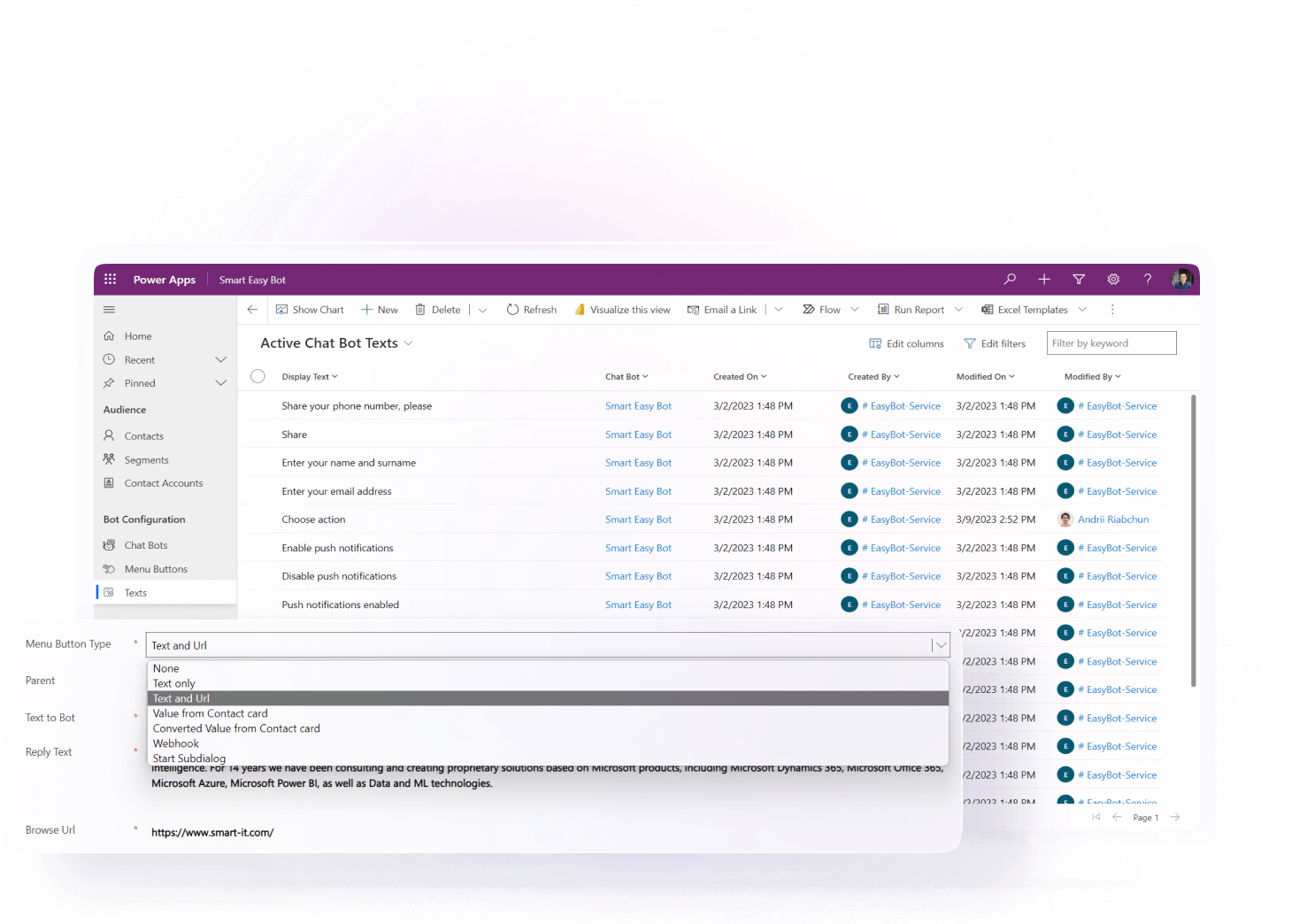
Create custom buttons

Add custom buttons with variations: text only, text + link, data output from your CRM system, data output from your CRM system with subsequent conversion to barcodes or QR codes

smart easy bot advantages 2 2
easy bot icon 2
Reach out to subscribers

Send messages to all active subscribers of your chatbot, set up interaction for selected segments and communicate with individual users

smart easy bot advantages 3 1
easy bot icon 3
Set up incoming communication

Use chats as a source of communication and getting feedback from your audience in the form of requests and files

smart easy bot advantages 4 1
easy bot icon 4
Expand your contact base

Populate the database with up-to-date and verified information about users using the registration function during the first use of the bot

smart easy bot advantages 5 1
easy bot icon 5
Create personalized messages

Generate individual texts for a specific user directly from your CRM system. Turn texts into barcodes or QR codes

smart easy bot advantages 6 1
easy bot icon 6
Manage in a single window

Manage chats in a single center with an intuitive and user-friendly interface directly in your CRM system

Blog

Articles and materials

25 min read
pl1
Common Sales Management Mistakes and How to Avoid Them

Sales mistakes rarely look like a disaster when they occur. More often, they accumulate unnoticed — in the form of poor follow-up discipline, unclear priorities, unrealistic forecasts, or inconsistent lead management — and only over time reveal themselves through lost deals, declining conversion rates, and reduced performance across the entire sales department.

According to Gartner, only 11% of sales organizations are able to maintain commercial performance during periods of transformation, and one of the key reasons for this gap is that 70% of sales managers feel overwhelmed by the number of technologies and processes they have to work with on a daily basis (Gartner, December 2024). At the same time, poor business results are rarely caused by the mistakes of a single salesperson. More often, they stem from systemic management decisions that become embedded in processes and gradually affect the performance of the entire team.

In this article, we will examine the most common sales mistakes made by managers and sales leaders and outline practical steps organizations can take to address them.

Why do sales management mistakes affect results so quickly?

Sales management is a system in which every decision made by a sales leader — from the way goals are set to how the sales pipeline is evaluated — directly influences the daily behavior of sales representatives. That is precisely why management mistakes have such a rapid and far-reaching impact: they do not remain isolated incidents but are replicated across the entire sales organization.

Let's look at how this plays out in practice.

Team priorities are shaped by what managers measure

If a sales leader focuses only on end results — such as deal value and quota attainment — sales representatives naturally prioritize what is immediately measurable rather than the quality of the sales process. Poor lead qualification, missed follow-ups, and opportunities that remain stuck in the pipeline without a clear next step often go unnoticed. This is not because salespeople lack the necessary skills, but because these aspects of performance are not expected.

Forecasting errors are more costly than they appear

Unrealistic sales forecasts cause businesses to allocate resources based on revenue that may never materialize, cases in point being marketing budgets, production capacity, and hiring plans. When actual sales fall significantly short of expectations, the business has already made decisions based on an inaccurate picture, requiring additional time and resources to correct course.

Weak onboarding of new sales managers

A new sales manager who has not been trained in customer engagement standards, lead qualification, and follow-up discipline will quickly adopt informal "rules" from colleagues or simply rely on intuition. In the best-case scenario, they reach an acceptable level of performance after several months. In the worst-case scenario, they develop poor habits that become difficult to change later.

Chaos in daily activities becomes the norm

When a sales department lacks a clearly defined process — how many calls should be made, when follow-ups should be sent, or how to assess whether a lead is ready to buy — each sales manager develops their own way of working. As a result, performance becomes unpredictable and difficult to interpret. It is unclear why one salesperson consistently closes deals while another does not. Without a standardized process, it is impossible to identify weak points or understand exactly where potential customers are being lost.

Misalignment between marketing and sales multiplies losses

Marketing generates leads based on one set of criteria, while Sales receives them and considers them unqualified. Or the opposite happens: Sales fails to follow up on leads in time, causing marketing budgets to be wasted. Without a shared definition of a "qualified lead" and common KPIs, both departments operate in parallel rather than in synergy. This lack of alignment negatively affects the performance of the entire commercial block.

All of these issues have one thing in common: they do not arise overnight. They develop through repeated management decisions that gradually become the norm. That is why addressing them individually means treating the symptoms rather than the root cause. Let's examine the specific mistakes sales leaders make — and what can be done to correct them.

The most common sales management mistakes

Most of these mistakes are well known to sales leaders — but that is exactly what makes them so dangerous. Teams become accustomed to them and eventually stop noticing them. Below are nine common sales mistakes that reduce sales team effectiveness, lead to lost deals, and distort the true picture of sales performance.

Lack of clear goals and priorities for the sales team

The problem: Sales managers work without a clear understanding of what should take priority: generating new leads, moving active deals forward, developing relationships with existing customers, or driving repeat sales. Each person decides for themselves where to focus their efforts — and more often than not, they choose what is most comfortable rather than what is most critical to the business.

The impact: The sales team spends its time and effort unevenly. Some deals remain stalled, while others receive excessive attention. As a result, overall performance becomes difficult to predict and manage.

How to fix it: Define clear priorities and align them with the team's weekly and monthly plans. A clear allocation of effort across different types of activities — prospecting, advancing active deals, and customer development — gives sales managers clear direction while enabling sales leaders to manage focus, not just results.

Managing only by results, without controlling the process

The problem: Sales leaders focus on the final numbers — how many deals have been closed and how much revenue has been generated — but do not monitor how sales managers are getting there: the number of calls they make, the quality of their follow-ups, or whether opportunities are progressing through the sales pipeline.

The impact: When results decline, sales leaders cannot identify where the breakdown occurred. Instead of diagnosing the specific stage where customers are being lost, the analysis is reduced to asking, "Why wasn't the target achieved?"

How to fix it: Monitor process quality, not just outcomes. Track conversion rates between pipeline stages, the quantity and quality of sales activities, and the percentage of opportunities with a clearly defined next step. This makes it possible to identify weak points before they affect final performance metrics.

Unrealistic forecasts and poor pipeline hygiene

The problem: The pipeline fills up with deals that are technically still "active" but have not progressed for years. Sales managers leave these opportunities in the pipeline to avoid making the picture look worse, while sales leaders fail to review the quality and status of each opportunity. As a result, the forecast appears optimistic, but actual sales tell a different story.

The impact: The business makes decisions about budgets, resources, and growth plans based on a distorted picture. When the gap between forecasted and actual sales becomes a recurring pattern, confidence in the sales department begins to decline across the organization.

How to fix it: Establish clear criteria for every stage of the sales pipeline and review it regularly. Opportunities that show no activity beyond a defined period should either be reactivated with a specific action plan or removed from the pipeline. Sales forecasts should reflect the actual likelihood of closing each deal — not optimistic expectations.

Weak lead qualification and poor opportunity prioritization

The problem: Sales managers spend the same amount of time on every incoming lead, regardless of its potential. Without a standardized qualification process, they rely on intuition rather than data.

The impact: The team's resources are spread too thin across low-potential leads, while genuinely promising opportunities receive too little attention — or are lost altogether.

How to fix it: Implement a standardized lead qualification framework, such as BANT (Budget, Authority, Need, Timeline) or MEDDIC (Metrics, Economic Buyer, Decision Criteria, Decision Process, Identify Pain, Champion), and embed it into your CRM. The mandatory fields in the lead record should reflect qualification criteria — not just contact information.

No follow-up standard and inconsistent sales rep activity

The problem: One sales manager sends a follow-up an hour after a call, another waits three days, and a third does nothing until the customer reaches out first. There is no clear standard defining when, how, or how often customers should be contacted after each stage of the sales process.

The impact: The company loses deals not because of its product or pricing, but because of inconsistent communication. Customers simply receive a better follow-up experience from competitors.

How to fix it: Define a follow-up standard for every stage of the sales process, including timing, communication channels, and message format. Automate reminders in your CRM system — sales managers should not have to keep track of follow-ups manually.

Request a consultation

Weak onboarding of new sales managers

The problem: New hires join the sales team without a structured onboarding process. They are given access to the CRM, provided with a few scripts, and told to "watch how the others do it." Customer engagement standards, lead qualification criteria, and the logic behind the sales pipeline are learned inconsistently — or not learned at all.

The impact: New sales managers take longer to reach full productivity, while mistakes made early on gradually become ingrained as standard practice. The time to first closed deal increases, and the workload on the rest of the team grows.

How to fix it: Develop a structured onboarding plan with clear milestones for the first 30, 60, and 90 days. Define exactly what sales managers should know, be able to do, and handle independently at each stage.

Implementing automation and AI without a structured process

The problem: The sales team adopts AI tools — for generating emails, scoring leads, or analyzing calls — without first defining the process those tools are meant to support. The tools are in place, but the process is not.

The impact: AI automates chaos rather than fixing it. Sales managers generate more activity, but of lower quality. The pipeline fills up faster, yet conversion rates do not improve. As a result, the investment in technology fails to deliver a return.

How to fix it: Build the process first, then introduce the tool. AI should support an already established sales process — not compensate for the lack of one.

Lack of work with data, KPIs, and real insights

The problem: Sales KPIs are either nonexistent or limited to a single metric — sales volume. Intermediate metrics, such as stage-to-stage conversion rates, average deal size, sales cycle length, and repeat sales rate, are neither tracked nor discussed.

The impact: Sales leaders cannot identify where losses occur and therefore cannot make informed management decisions. The sales department operates like a "black box."

How to fix it: Define a set of metrics for every level of performance — activities, conversions, and outcomes — and make them a regular part of performance reviews. All data should be captured in the CRM system and available in real time.

Inconsistent collaboration between sales, marketing, and customer service

The problem: Marketing hands over leads that sales either fail to follow up on or consider unqualified. Customer service identifies customer issues, but sales remains unaware of them. Each department operates within its own information silo.

The impact: The company misses opportunities to increase average deal value, drive repeat sales, and improve customer retention. This disconnect directly reduces the effectiveness of the entire commercial block.

How to fix it: Establish a shared definition of a "qualified lead" across marketing and sales. Put in place a regular process for sharing customer insights from customer service with the sales team. A single CRM system, where all three functions have a complete view of the customer, is the foundation for this alignment.

Mistakes in lead qualification, follow-up, and daily sales rep work

If the previous section focused on management decisions, this one looks at how those issues surface in the day-to-day work of sales representatives — in the way they qualify leads, communicate with prospects, and prioritize their daily activities.

Qualifying leads "by instinct" instead of using clear criteria

One of the common mistakes when qualifying sales leads is relying on intuition instead of objective criteria. A sales representative looks at a lead and instinctively decides whether it is worth investing time in. Sometimes that works. But when there is no single qualification standard — for example, documented criteria covering budget, the contact's role, urgency, and product fit — qualification decisions depend on the experience and judgment of the individual salesperson. As a result, two sales representatives may evaluate the same lead differently, with both convinced they are right.

The outcome is obvious: some promising prospects are filtered out too early, while low-potential leads receive too much attention — which is one of the most costly sales lead generation mistakes. The sales team spends its time and resources unevenly — and on the wrong opportunities.

Moving to the product presentation too early

One of the most common mistakes in sales discovery calls is talking about the product before understanding the customer's actual needs. The sales representative wants to demonstrate expertise and get straight to the point but ends up presenting a solution to a problem the customer has not even identified as a priority.

The customer hears all the right words but doesn't feel genuinely heard. As a result, trust does not increase, and the deal loses momentum.

Follow-up messages with no value and no clear next step

One of the most common mistakes in sales follow-up emails is sending messages like: "Just wanted to check whether you've made a decision." Such follow-ups do nothing to move the conversation forward. The customer has no reason to reply if the message provides no new value and doesn't suggest a specific next step. The sales representative has technically made contact — but in reality has simply reminded the customer they exist without offering anything useful.

A high-quality follow-up should always have a clear purpose: sharing relevant information, proposing a specific topic for discussion, confirming a previous agreement, or suggesting the next point of contact.

A chaotic workday with no clear priorities

A sales representative starts the day without a clear plan: first replying to emails that arrived overnight, then making a few calls, switching to preparing a commercial proposal, and then returning to email again. As a result, the most important opportunities — those that require active follow-up and careful progression — receive attention only after everything else.

Without a structured workday, sales representatives inevitably react to whatever feels most urgent instead of focusing on the activities that truly contribute to achieving sales targets.

Failing to handle objections effectively

A sales representative hears, "It's too expensive," or "This isn't relevant for us right now," and either gives up or immediately offers a discount as the first response. Objection handling has either never been developed as a skill or is simply not part of the sales team's standard process.

An objection is not a rejection. It is a request for additional information or a signal that the sales representative has not yet uncovered the customer's real need. When there are no objection-handling scripts and no regular practice responding to common objections, every sales rep handles the situation differently — and the results naturally vary. These are exactly the kinds of sales mistakes that lose deals.

Common mistakes in using AI in sales

Today, AI helps sales teams analyze calls, draft emails, predict the likelihood of closing deals, automate routine tasks, and identify hidden patterns in data.

However, one of the most common mistakes in using AI sales tools is expecting them to solve problems within the sales department on its own. In reality, the opposite happens: if sales processes are poorly designed, artificial intelligence will simply amplify those weaknesses. Automated chaos is still chaos — it just moves faster.

Let's look at the common mistakes teams make with sales automation when implementing AI.

Automating chaos instead of optimizing processes

One of the most common mistakes in using AI sales tools is implementing them before the team has established a consistent way of working.

If sales representatives qualify leads differently, fail to follow the same sales pipeline stages, or maintain CRM records inconsistently, AI cannot compensate for those shortcomings. On the contrary, it will rely on poor-quality data and generate equally unreliable recommendations.

Before automating any process, it is essential to clearly define every stage of the sales cycle, standardize the sales team's workflows, and establish measurable KPIs. Only then can AI deliver tangible business value.

Using AI without high-quality data

Every AI model depends on the quality of the information it receives. If the CRM contains duplicate customer records, sales representatives fail to complete required fields, do not record call outcomes, or neglect to document the next steps for opportunities, the system cannot produce reliable forecasts or identify risks within the sales pipeline.

Before implementing AI, companies should audit their data, clean up the CRM, and establish consistent data management standards. Doing so significantly improves the accuracy of AI recommendations and forecasts.

Replacing sales representatives with artificial intelligence

Another of the common mistakes in sales automation is attempting to hand over all customer communication to AI.

Artificial intelligence is highly effective at routine tasks: preparing commercial proposals, summarizing meetings, helping create personalized emails, and analyzing sales calls. However, it cannot fully replace a sales representative where trust, negotiation, empathy, and creative thinking are required.

The best-performing companies use AI as a personal assistant to sales representatives rather than as a replacement for them.

Failing to monitor and validate AI-generated results

AI can make mistakes, especially when working with complex or incomplete data.

For that reason, sales managers should not automatically trust every recommendation generated by the system. Forecasts, meeting summaries, lead evaluations, and automatically generated responses all require human review — particularly when they influence important business decisions.

Many common mistakes sales teams make with AI stem from assuming that automation guarantees accuracy. Effective AI adoption requires not only automation but also continuous quality control of AI-generated outputs.

AI does not make a weak sales process effective. It makes it faster. That is why artificial intelligence delivers the greatest value when sales operations already have a clear structure, standardized processes, high-quality data, and well-defined KPIs. In that case, AI becomes not a way to hide chaos, but a tool for eliminating it.

Request a consultation

The role of CRM in reducing sales management mistakes

When there is no single system for tracking leads, deals, activities, and results, sales management quickly turns into a series of assumptions. In this environment, sales representatives follow different approaches, data is scattered across multiple sources, and sales managers see only the final outcome — without understanding what led to it.

This is where a CRM system becomes much more than a record-keeping tool. It provides the foundation for effective sales management by replacing intuition with a structured, measurable process in which every stage can be tracked, compared, and continuously improved. It is one of the most effective ways to avoid sales mistakes before they affect business performance.

How CRM reduces sales management mistakes

When implemented correctly, a CRM system effectively shines a light on weaknesses that previously remained hidden.

  • First, it eliminates chaos in the sales pipeline. Every opportunity follows the same stages, with clearly defined statuses and transition criteria. This minimizes situations where sales representatives keep "dead" opportunities in the pipeline or inflate forecasts simply to make the pipeline look healthier.
  • Second, CRM standardizes customer interactions. Follow-ups, calls, emails, and next steps become part of a structured workflow rather than relying on each sales representative's personal discipline. This directly addresses one of the most common sales mistakes to avoid — losing deals because of inconsistent communication.
  • Third, CRM gives sales managers visibility into the process rather than just the outcome. Conversion rates between pipeline stages, deal velocity, sales activity, and lead quality all become measurable. Sales management shifts from reacting to problems ("Why didn't we hit the target?") to preventing them ("Where exactly are we losing efficiency?").

CRM as the foundation for data management and KPIs

One of the main reasons sales teams make mistakes is the lack of a single, reliable source of data. Sales representatives may interpret opportunity stages differently, fail to record call outcomes, or work with leads that have never been properly qualified. CRM solves these issues through standardization: mandatory fields, consistent pipeline stages, automated reminders, and built-in data quality controls.

As a result, KPIs become more than formal reporting metrics. They begin to reflect how the team actually performs — not only how much was sold, but also how sales were achieved, which channels generated results, what the conversion rates were, and where opportunities were lost.

This is especially important in sales management, where small process deviations accumulate over time and eventually become significant business losses. Understanding common mistakes in sales and how to avoid them starts with having accurate, consistent data.

CRM as a platform rather than just a tool

A modern CRM system serves as the operational platform for the entire commercial block, bringing together sales, marketing, and customer service. It consolidates customer data from every touchpoint, providing a complete view of the customer journey — from the first lead through repeat business.

Within this context, solutions from the Microsoft ecosystem and implementation partners such as SMART business enable companies to build an integrated digital infrastructure for sales management.

SMART business specializes in implementing and customizing Microsoft-based CRM solutions, helping organizations automate processes while redesigning the way their sales departments operate.

Rather than offering a single universal solution, the company helps businesses select the CRM platform that best fits their specific requirements, including Microsoft Dynamics 365 Sales, Microsoft Dynamics 365 Customer Service, Microsoft Dynamics 365 Customer Insights, Microsoft Dynamics 365 Field Service, and Microsoft Dynamics 365 Contact Center.

In addition, SMART business develops its own SMART CRM platform, enabling organizations to tailor CRM capabilities to both SMB and enterprise environments, as well as to individual business processes.

CRM as a tool for eliminating chaos — not digitizing it

It is important to understand that CRM does not automatically fix a weak sales process. Instead, it prevents chaos from being mistaken for effective management.

When sales processes are properly defined, CRM helps:

  • eliminate misalignment between marketing, sales, and customer service
  • synchronize the work of sales representatives
  • reduce losses at every stage of the sales pipeline
  • improve forecast accuracy
  • turn KPIs into practical management tools rather than formal indicators

Most importantly, CRM makes sales processes transparent. If there is a weakness in sales management, it becomes visible immediately — not after the quarter has already ended.

Conclusion

CRM is not about monitoring sales representatives. It is about managing the sales process.

That is why organizations that implement CRM as part of a comprehensive sales management strategy — rather than simply as a record-keeping system — are far less likely to encounter the common sales mistakes and are much quicker to identify new opportunities for improving sales performance.

Request a consultation

How to measure whether sales management is improving

To assess progress objectively, it is important to look beyond individual results and focus on how the entire sales process is evolving — from the first customer interaction to a closed deal and repeat business.

Deal movement through the sales pipeline

One of the most accurate indicators of improvement is how opportunities move through the sales pipeline. If deals previously remained stalled without any activity but now progress through the pipeline more consistently and with fewer losses, this is a clear sign that sales management has improved.

Pay particular attention to intermediate conversion points:

  • how many opportunities move to the next stage
  • where deals are being lost (for example, if most opportunities stall after a commercial proposal is sent, this may indicate issues with its value proposition, pricing, or the quality of follow-up communication)
  • whether the time spent at each stage is decreasing

These metrics show whether the sales team is actually working more systematically rather than simply closing a few large deals. Avoiding common mistakes in sales metrics tracking starts with monitoring process indicators instead of relying solely on final revenue figures.

Predictability of results

Another important indicator is forecast stability. In poorly managed sales departments, forecasts often look optimistic while actual results fluctuate significantly.

Improvement becomes visible when:

  • the gap between forecasts and actual results narrows
  • the number of "unexpected" outcomes decreases
  • quarterly performance becomes more consistent

The goal is not simply to sell more in a particular month, but to make sales results more predictable.

Response time and sales cycle length

A high-performing sales department almost always means customers move through the buying journey more quickly. This can be measured by tracking:

  • time to first contact with new leads
  • follow-up response times
  • the overall sales cycle length

If these metrics improve without compromising quality, it indicates that the sales process has become more structured and that sales representatives are following a consistent workflow rather than reacting to situations as they arise. Avoiding common mistakes in measuring sales cycle length requires tracking these indicators consistently over time.

Quality of customer engagement — not just activity volume

The number of calls made or emails sent says very little about sales effectiveness on its own. What matters much more is what happens after those interactions.

Signs of improvement include:

  • more opportunities with a documented next step
  • a higher percentage of qualified leads
  • fewer "dead" contacts in the CRM system
  • more consistent communication throughout every stage of the sales process

These indicators demonstrate that sales representatives are working more effectively, not simply doing more work.

Consistency across the sales team

In a well-managed sales department, performance becomes more consistent across different sales representatives — not because everyone performs at exactly the same level, but because the underlying sales process has been standardized.

Key metrics to monitor include:

  • differences in conversion rates between sales representatives
  • variations in sales cycle length
  • consistency in lead qualification and follow-up practices

The smaller the gap between top performers and average performers, the more effective the overall sales management system becomes.

Request a consultation

The role of CRM in measuring progress

Without a CRM system, most of these metrics are either unavailable or have to be collected manually, making the information incomplete and outdated. As a result, management decisions are always based on yesterday's reality rather than today's.

CRM changes this in three important ways:

  1. Continuous data collection. Every sales activity is automatically recorded in the system, including calls, emails, status changes, and next steps. This creates a complete picture of the sales process without requiring manual effort.
  2. Historical comparison. CRM allows organizations to compare performance across weeks, months, and quarters. This is critical to distinguish genuine improvement from temporary fluctuations.
  3. Consistent measurement standards. When every sales representative works within the same CRM environment, metrics cease relying on interpretations. Conversion rates, sales cycle length, and activity metrics are measured consistently across the entire team, helping organizations avoid common mistakes in sales metrics tracking.

As a result, CRM makes it possible to distinguish real improvement from short-term fluctuations and identify exactly where the sales process is becoming more effective.

Ultimately, improving sales performance is not a matter of intuition — it is a measurable process. The more accurately a company can measure that process, the faster it can identify genuine growth opportunities, whether in the sales pipeline, response times, customer engagement, or team consistency.

Need help automating your sales processes?

If your company is already struggling with disorganized sales processes, inaccurate forecasts, lost leads, or simply wants to improve team performance, the right place to start is with well-designed processes supported by the right technology.

The SMART business team can help you analyze your business processes, select the CRM solution that best fits your needs, or develop a customized sales automation system tailored to your business. From implementing Microsoft Dynamics 365 and SMART CRM to integrating AI and developing low-code/no-code solutions, SMART business helps organizations build sales operations that are predictable, scalable, and designed for sustainable growth.

Request a consultation, and our experts will help you determine which solution best aligns with your business goals and stage of growth.

Request a consultation
10 min read
Cloud CRM System — Why Is It Worth Choosing?

A good CRM system is now much more than a passive repository of information — it has become a central tool that seamlessly brings together sales, customer service, marketing, and analytics into a single, integrated ecosystem. The challenge is that traditional software often requires investment in on-premises hardware, lengthy implementation projects, and ongoing IT support. That is precisely why cloud-based CRM systems have come to dominate the market.

According to the latest Precedence Research report on the SaaS CRM market, the global value of this sector reached $68.5 billion in 2025 and is projected to grow to $224.4 billion by 2035. What's more, the report shows that cloud-based solutions already account for 70% of the market. This growth is driven by the increasing demand for AI-powered tools and the need to automate customer service workflows.

By adopting the Cloud-based CRM model, a company aligns itself with this global trend and gains a solution that is ready to use immediately — continuously updated, accessible from any device, and free from the burden of maintaining its own technology infrastructure. Before following this trend and moving your business processes to the cloud, however, it is worth understanding what this technology actually offers and whether it is the right fit for every business.

What is Cloud CRM?

Cloud CRM is a CRM system that you don't need to install physically in your office. The entire system architecture and databases are hosted on the vendor's secure servers, while your team has full access to them over the Internet. This means you don't need to install any software on company computers — to take full advantage of the system, all you need is a standard web browser or a mobile app on your smartphone.

It is this separation from the underlying technical infrastructure that makes CRM in the cloud such a powerful solution. To better understand what Cloud CRM is and the scale of this shift, it is worth comparing the cloud model with the traditional CRM systems that dominated the market until quite recently.

Cloud CRM vs. Traditional CRM

AreaTraditional CRM (On-premises)Cloud CRM
IT environment managementFully managed by your companyManaged by the external vendor
Hardware infrastructureRequires purchasing and physically maintaining your own serversInfrastructure is provided by the vendor — no capital investment required
Software installationLocal installation on company hardware is requiredBrowser-based access, ready to use
Security and updatesYour company is responsible for network security and implementing updatesThe vendor handles all technology management and software updates
Entry barrierHigh (requires investment in hardware and IT resources)Low (typically subscription-based)
Deployment timeLonger due to installation and configuration before launchShorter — the environment is ready immediately, with configuration and data migration carried out during implementation

How does cloud CRM work in practice?

In day-to-day operations, cloud CRM software is built around a single, centralized database that updates in real time. Whether a sales representative updates the status of a sales opportunity from the office or while traveling on a business trip, the rest of the team can immediately see the changes. This synchronization minimizes the risk of working with outdated information and prevents the creation of so-called information silos.

SaaS model and the vendor's role

Most cloud CRM solutions are delivered under the SaaS (Software as a Service) model. From a business perspective, this means shifting from a one-time software purchase to a subscription-based model. The company pays a recurring subscription fee, which covers not only access to the application, but also computing resources, data storage, and technical support.

Access to data from anywhere

One of the biggest advantages of CRM in the cloud is complete mobility. Sales teams, managers, and customer service employees can access the system from anywhere in the world using any device connected to the Internet. This is a significant advantage for organizations that support hybrid work, as well as for sales departments whose employees spend much of their time working in the field.

Updates, backup and system maintenance

By using software delivered under the SaaS model, companies eliminate the need to manually create backups or perform complex migrations to newer software versions. The vendor is responsible for regular backups, infrastructure security, and the ongoing deployment of updates, without requiring any involvement from the customer's IT team. As a result, the internal IT department is freed from routine system maintenance tasks.

Benefits of Cloud CRM

The benefits of cloud CRM extend far beyond optimizing your IT infrastructure — they represent a strategic decision that directly improves operational efficiency and supports business growth. In today's increasingly competitive market, fast, personalized customer service and seamless information flow have become key competitive advantages. To meet these expectations, you need tools that can keep pace with your business. So, what exactly do you gain by moving your operations to the cloud?

Lower entry costs and faster deployment

Without the need to purchase expensive servers or build a dedicated IT infrastructure, the initial investment required to implement the system is significantly lower. The subscription model allows software to be treated as an operating expense, while the deployment of the technical environment is often measured in weeks rather than months.

If you want to plan this process effectively and understand the costs involved, read our article: CRM Implementation: Stages, Costs, and Best Practices.

Scalability and flexibility

As your business grows, adding new user accounts or expanding the system's functionality in the cloud requires just a few clicks. These systems easily adapt to changing business needs — they can be quickly scaled up during periods of rapid growth or scaled down by reducing the number of licenses during quieter periods.

Better accessibility and team collaboration

Shared access to data ensures that everyone in the organization works from a single source of truth. At the same time, it is important to remember one fundamental principle: technology is designed to save salespeople's time and free them from repetitive tasks — not to replace human interaction. By automating time-consuming administrative processes, note-taking, and reporting, teams can focus on what truly matters: proactively and empathetically building lasting customer relationships.

Limitations of cloud CRM

Despite the many benefits of cloud CRM, cloud-based solutions also have limitations that should be considered before making a final decision.

Data security and compliance requirements

Although global vendors invest billions in securing their data centers, some organizations still consider storing sensitive data outside their own infrastructure to be a challenge. This is particularly true for financial institutions and healthcare organizations, which are often subject to strict regulations governing where information can be stored.

Vendor dependency and subscription model

By choosing the cloud, a company becomes dependent on the stability of an external service provider. Most vendors guarantee 99.9% uptime under their Service Level Agreement (SLA), but even a brief outage can result in temporary loss of access to business-critical tools. In addition, although the initial costs are relatively low, subscription fees accumulated over many years may become comparable to the cost of an on-premises solution. However, any meaningful comparison should also take into account the costs of hardware, infrastructure, and ongoing maintenance.

Constraints for highly customized needs

Ready-made SaaS platforms offer extensive configuration options, but their core architecture remains closed to users. Companies with highly specialized or niche manufacturing and sales processes may encounter technological limitations that are difficult — or even impossible — to overcome within a standard cloud-based CRM system.

Cloud CRM vs. On-Premises CRM — which one to choose?

The right choice ultimately depends on your company's profile. Cloud CRM solutions clearly outperform on-premises systems in terms of implementation speed, ease of use, and lower upfront investment. The on-premises model remains the preferred option for large enterprises with extensive IT departments. These organizations require complete control over their infrastructure and data due to strict security policies. It is also the preferred choice for companies operating in industries where data residency is subject to specific regulatory requirements.

Who should choose Cloud CRM?

In practice, Cloud CRM is the natural choice for modern organizations that prioritize operational agility. Managing customer relationships in real time is one of the most effective ways to shorten the sales cycle and build customer loyalty. Companies that move to the cloud gain not only a secure solution but, above all, a technological advantage — they can scale their processes from month to month and respond quickly to changing market conditions. Today, cloud-based CRM software is one of the fastest ways to achieve these goals.

Small and medium-sized businesses

A cloud-based CRM for small business is often the most accessible and cost-effective way to implement professional CRM software. It enables organizations to streamline their sales processes without the need to maintain a large and costly IT team.

Mobile sales teams

For companies that rely on field sales representatives, regional managers, and customer advisors, CRM in the cloud is practically indispensable. The ability to quickly add meeting notes from a tablet while on the road helps shorten the sales cycle and improves the quality of the data collected.

Companies that want to reduce IT burden

SaaS solutions are an ideal choice for organizations that want their IT departments to focus on developing their core products instead of managing infrastructure, deploying updates, and maintaining system security.

Multi-branch and international companies

Organizations with offices in multiple cities or countries benefit from a single, unified work environment without the need to synchronize local databases. Every office works with the same up-to-date information, regardless of its location or time zone.

Fast-growing companies

For organizations that are expanding rapidly and regularly hiring new employees, the cloud eliminates one of the biggest administrative challenges — onboarding a new employee no longer requires any involvement from the IT department. A new user account can be created in just a few minutes, allowing employees to start working immediately with the latest data available to the entire team.

How to choose a cloud CRM system?

Moving from theory to a purchasing decision requires careful analysis. To ensure your cloud CRM solution genuinely supports business growth, consider the following criteria when evaluating your options:

  • Security and certifications: What data encryption standards does the vendor use, and does it hold compliance certifications such as ISO 27001 and GDPR?
  • Integration capabilities: Can the software seamlessly integrate with your existing ERP system, email platform, and marketing tools?
  • Usability and mobile app: Is the interface intuitive, and can users adopt it quickly?
  • Transparent pricing model: Do the pricing plans include hidden costs for basic functionality?
  • Scalability and licensing: As your team grows, can you easily add new users without a disproportionate increase in costs?
  • Technical support and SLA: What level of system availability does the vendor guarantee, and how quickly do they respond to support requests?

The guidance of experienced specialists can be invaluable during the decision-making process. The right technology partner, such as SMART business, provides professional consulting at every stage of your digital transformation journey. As a trusted implementation partner with many years of experience in business automation, access to the Microsoft Dynamics 365 ecosystem, and its proprietary SMART CRM platform, SMART business helps organizations select and tailor solutions that deliver long-term improvements in sales performance and customer service. With the right solution in place, your CRM system becomes much more than a contact database — it becomes a tool that actively drives business growth and generates revenue.

Request a consultation
25 min read
1 11
Lead Generation and Lead Management with AI: How to Improve Sales Efficiency

Just a few years ago, AI in sales was mainly associated with automated email writing or website chatbots. Today, the situation has evolved much further: artificial intelligence enables a complete redesign of how organizations work with leads — from contact generation and behavioral analysis of potential customers to lead scoring, routing, and follow-up automation.

At the same time, most companies still spend a significant portion of their marketing budgets on lead acquisition, while converting only a small fraction of those leads into actual deals. Not because there are too few leads, but because the process of handling them — from the first touchpoint to sales handover — remains slow, manual, and often inconsistent. According to McKinsey (State of Marketing Europe 2026), only 6% of marketing organizations have reached a mature level of generative AI adoption — and these companies are already seeing a 22% efficiency increase, with expectations to reach 28% over the next two years. Meanwhile, Gartner predicts that by 2027, 95% of sales research processes will begin with AI. This is no longer a distant trend — it is a shift happening right now.

At the same time, the buyer itself is changing. A large number of B2B buyers already use generative AI during pre-purchase research — they compare vendors, define requirements, and build shortlists even before visiting a supplier’s website for the first time. This leads to a simple conclusion: if your team still handles leads manually — spreadsheets, manual qualification, delayed follow-ups — it is reacting to decisions that have already been made, rather than shaping them. This is exactly where AI tools combined with CRM systems become a prerequisite for competitiveness, as they enable earlier lead detection, more accurate qualification, and faster responses at every stage of the funnel. That is why AI in Lead Generation and Lead Management is now a practical tool for improving marketing and sales performance.

What AI in Lead Generation and Lead Management is — and why businesses are moving from manual work to automation

Despite the evolution of CRM and automation tools, lead management in many companies is still largely manual: marketing launches campaigns, collects contacts, transfers them into the CRM, and then sales managers manually review leads, prioritize them, validate data, send follow-ups, and try not to lose potential customers somewhere between spreadsheets, emails, and dozens of tasks. The problem is that as communication channels and data volumes grow, this approach starts to break down. Teams simply cannot keep up with the signals generated by potential customers every day.

Today, AI in Lead Generation and Lead Management is no longer just a trendy add-on to CRM systems — it is becoming a core operational efficiency tool. Artificial intelligence can automatically analyze audience behavior, detect purchase intent before a transaction happens, evaluate lead quality, trigger personalized engagement workflows, and help sales teams respond much faster.

At the same time, it is important to distinguish between two processes that are often mistakenly combined into one:

  • Lead Generation — the process of generating leads and attracting new contacts into the sales funnel. It involves identifying potential customers, targeting, and collecting contacts through websites, email campaigns, advertising, forms, chatbots, or other lead generation tools.
  • Lead Management — everything that happens after a lead enters the system: qualification, enrichment of lead data, lead scoring, prioritization, routing between sales representatives, follow-up automation, and preparation for handover to the sales team.

While AI was previously used mainly to automate isolated marketing tasks, modern companies increasingly implement AI across the entire lead lifecycle — from first contact to deal closure.

In practice, AI helps businesses move from a model of “manually reacting to everything” to a data-driven approach where the system itself indicates:

  • which leads have the highest potential
  • who is ready to be contacted right now
  • which communication channel will perform best
  • when follow-ups should be triggered
  • and which contacts are not yet ready to buy

This is especially relevant in B2B environments, where sales cycles are longer and the number of customer touchpoints can reach dozens. In such conditions, AI helps reduce lead leakage between funnel stages, increase team response speed, and improve the quality of customer communication.

Moreover, modern AI tools in CRM systems can now work not only with historical data but also with real-time behavioral signals: website interactions, email engagement, product page views, content reactions, or social media activity. This approach enables a more accurate understanding of purchase readiness and helps avoid wasting resources on “cold” contacts with no real buying intent.

That is why AI in lead generation today is about giving marketing and sales more context, speed, and precision in working with leads at every stage of the funnel.

AI in Lead Generation: how to attract more high-quality leads, not just more leads

One of the most common misconceptions about AI in lead generation is that it is limited to automated contact collection or mass content creation. In reality, modern AI tools have a much deeper impact — they help businesses make the entire lead generation process more precise, personalized, and data-driven.

In practice, AI is reshaping the very approach to Lead Generation: instead of working “blindly,” companies are starting to make decisions based on behavioral signals, analytics, and predictive insights. AI within CRM systems can analyze potential customers’ actions, identify patterns, detect purchase intent, and help marketing and sales teams focus on the leads with the highest likelihood of conversion.

What is especially important is that AI does not just help generate more contacts — it improves lead quality itself. A high volume of inquiries does not automatically mean effective lead generation. If teams spend time on random or irrelevant contacts, resources are wasted even before the sales stage begins.

Better targeting and audience identification

Traditional lead generation is often based on basic parameters such as job title, industry, company size, demographics, or traffic source. However, in reality, this is no longer sufficient. Even seemingly similar prospects may be at completely different stages of purchase readiness.

AI tools can automatically identify:

  • which companies show buying intent signals
  • which users engage more frequently with content
  • which product pages are visited before making contact
  • which actions most often precede conversion

As a result, marketing teams stop working with overly broad audiences and begin focusing their efforts on the leads most likely to convert into sales.

This is especially visible in B2B marketing and, for example, in LinkedIn campaigns, where AI helps identify lookalike customer profiles, analyze behavioral patterns, and discover potential clients that previously might have been overlooked.

Personalized messaging instead of mass outreach

Another reason why AI in Lead Generation is becoming a key marketing tool is its ability to scale personalization without proportionally increasing team workload.

Modern AI solutions can automatically adapt:

  • email campaigns
  • website content
  • advertising messages
  • product recommendations
  • communication workflows

Importantly, personalization is no longer limited to simply inserting a name into an email. AI analyzes user behavior, interaction history, interests, traffic sources, previous brand interactions, and even the likely stage of the buying journey.

For example, one prospect may receive a case study on cost optimization, another — content about business scaling, and a third — an invitation to a product demo. Everything depends on the signals the system detects in each lead’s behavior.

This is why AI not only automates communication but also makes it significantly more relevant. This directly impacts email open rates, conversion rates, and the overall effectiveness of the lead generation system.

Chatbots, forms, and 24/7 automated lead capture

Another important use case of AI in Lead Generation is automating lead capture through websites, messaging platforms, and digital communication channels.

Modern AI-powered chatbots are no longer simple rule-based interfaces with buttons. They can:

  • ask follow-up questions
  • qualify leads
  • respond to common inquiries
  • collect contact details
  • trigger follow-ups
  • pass leads into the CRM or to a responsible sales manager

At the same time, AI makes the lead capture process less intrusive and more natural for users. For example, instead of long website forms, a customer can engage in a short conversation with a bot that gradually collects the necessary information.

Additionally, AI can optimize lead capture forms themselves: it analyzes which fields reduce conversion rates, which questions discourage users, and which ones improve lead quality.

As a result, businesses receive more relevant prospects with a higher probability of conversion into actual sales.

How AI helps bring order to Lead Management and prevent losing leads on the way to sales

A key challenge for many companies is not only lead generation, but what happens after a lead enters the system. Even a high-quality lead can easily be lost if the team responds too slowly, misprioritizes opportunities, or works with incomplete data. That is why AI in Lead Management is increasingly used not as a standalone automation tool, but as a way to build a more controlled, faster, and data-driven process for handling potential customers.

In practice, AI in CRM systems helps analyze lead behavior, assess purchase readiness, automatically trigger the right engagement workflows, and enable sales teams to focus on the contacts with the highest potential. For example, if a potential customer repeatedly visits a product page, opens a commercial proposal, views a case study on the website, and submits a request after a webinar, the system can automatically classify such a lead as “hot,” prioritize it in the CRM, and immediately assign a follow-up task to a sales manager. At the same time, contacts who only visited the website once without further interaction can be placed into a nurture workflow without occupying sales resources.

Automated lead qualification

In traditional processes, sales managers often spend a significant amount of time manually reviewing leads: who submitted a request, how well the company matches the ICP (Ideal Customer Profile), whether there is real interest in the product, and whether it is worth initiating contact at all. The problem is that as communication channels and lead volumes grow, this model starts to slow down sales operations.

AI allows a significant part of this work to be automated. The system can analyze data from CRM, websites, email campaigns, social media, marketing forms, chatbots, and other sources to automatically determine:

  • how well a lead matches the target audience
  • which pages or products the lead is interested in
  • whether they have interacted with content
  • the level of engagement

As a result, the sales team receives pre-qualified leads instead of a chaotic flow of requests that must be manually sorted. This is especially important in B2B sales, where the sales cycle is longer and misjudging a lead’s potential can cost the team weeks of effort.

Lead scoring and prioritization

Not all leads have equal value for a business — and this is where AI significantly transforms lead scoring. While traditional scoring models are often based on static rules such as “opened email = +5 points,” modern AI models analyze a much broader context.

The system can take into account:

  • website behavior
  • content interaction history
  • email engagement
  • traffic source
  • response speed
  • company type
  • historical data from previous successful deals

As a result, AI not only assigns lead scores automatically but also predicts conversion probability with much higher accuracy. Sales teams can clearly see which leads should be prioritized and which are still “cold.”

This is especially valuable for companies with high lead volumes, where managers cannot manually process every contact with equal attention. AI removes guesswork and helps focus resources on the most promising opportunities.

Lead routing and faster follow-up

Response speed often has a direct impact on conversion rates. If a potential customer submits a request but receives a reply only hours or even a day later, part of the interest is already lost. This is particularly critical in competitive markets where buyers are simultaneously engaging with multiple vendors.

AI enables automated lead routing and near real-time follow-up execution. A CRM system can automatically:

  • assign leads to the right sales manager
  • take into account sales team specialization (for example, if one sales manager works with enterprise clients, another with small businesses, and a third specializes in a specific product, the system automatically routes the lead to the specialist with the highest expertise in the relevant area)
  • route leads by region or product
  • trigger automated emails or messages
  • send follow-up reminders
  • determine the optimal timing for re-engagement

As a result, companies reduce speed-to-lead — the time between lead creation and the first sales response — and significantly decrease the risk of losing potential customers due to delayed communication.

In addition, AI helps make follow-ups less generic. Instead of identical messages, the system can generate personalized engagement scenarios based on lead behavior, interests, or funnel stage. This is why modern AI in CRM is ultimately about more relevant and timely communication with potential customers.

How to implement AI for Lead Generation and Lead Management: where to start and how to avoid common mistakes

One of the most common mistakes when implementing AI in lead management is starting with tool selection. A company adopts a new solution, integrates it with the CRM, configures automation — and a few months later, the results are disappointing: the AI is in place, but nothing has really changed. In most cases, the problem is not the technology. The problem is that the organization has not prepared its data, processes, or teams.

AI amplifies what already exists. If the lead management process is chaotic, automation will only accelerate that chaos. If CRM data is incomplete or outdated, scoring models will produce inaccurate results. That is why implementing AI in Lead Generation and Lead Management should be seen not as a technical project, but as a structural transformation of how a business attracts and manages potential customers.

Start with the process and define what a “high-quality lead” is

Before any AI tool can correctly evaluate or prioritize leads, you need to answer a fundamental question: what exactly defines a high-quality lead for your business?

This may sound obvious — but in practice, marketing and sales often have different interpretations. Marketing may consider anyone who leaves an email a lead. Sales may only consider those ready for a meeting this week. The real definition of a “high-quality lead” for a specific business is usually somewhere in between — and this alignment must be clearly established.

To achieve this, you should define or update your ICP (Ideal Customer Profile) and establish lead qualification criteria — for example, using BANT (Budget, Authority, Need, Timeline) or another framework that fits your sales cycle. Without this, AI will not have reliable signals to learn from or evaluate against.

At the same time, you should define key funnel stages: where a lead becomes a Marketing Qualified Lead (MQL), where it becomes a Sales Qualified Lead (SQL), and when it is ready for handover to sales. The clearer these boundaries are, the more accurately AI tools can determine each lead’s stage and trigger the appropriate next action.

Clean your data and connect your sources

AI in lead generation and lead management is only as effective as the quality of the data it receives as input. This is not an exaggeration — it is a technical reality. If your CRM contains thousands of duplicates, outdated contacts, empty fields, or inconsistent formats for the same data, any scoring or qualification model will simply not be able to perform correctly.

That is why, before launching any AI tools, it is important to conduct a data audit:

  • remove or merge duplicate contacts and companies
  • standardize field formats (job titles, industries, company sizes)
  • fill in critical missing fields

It is also essential to connect all lead sources into a single system. If website data goes into one place, social media campaign leads into another, and webinar registrations are tracked in spreadsheets, AI will not be able to build a complete view of customer behavior. This is why successful AI implementation in Lead Management starts with centralizing data in the CRM as a single source of truth for the entire team.

Companies that have already gone through this process consistently confirm that even without advanced AI models, a clean and well-structured database significantly improves lead management efficiency. AI simply scales this existing advantage.

Align marketing and sales — and formalize agreements

One of the most common hidden barriers to effective AI-driven lead generation is not technology, but the gap between marketing and sales. Two teams may use the same tool, but if their expectations and lead evaluation criteria differ, the outcome will be disappointing for both sides.

Before scaling automation, it is important to establish a shared understanding of several key points: which leads are passed from marketing to sales and when, what defines a successful follow-up and the expected response time, and how sales provides feedback on lead quality. Without this alignment, even the best AI-based scoring system will create friction between teams instead of driving efficiency.

This is also where platform choice becomes important. Companies that require deep AI integration in CRM and end-to-end visibility across marketing and sales processes often work with experienced implementation partners. For example, SMART business — a Microsoft technology partner with extensive experience in CRM and AI implementations — helps organizations go beyond selecting tools and build a fully integrated lead management ecosystem where AI, data, and team processes operate as a single system.

Ultimately, the effectiveness of AI in Lead Generation and Lead Management is not defined by the features of a specific tool, but by how well it is embedded into real business processes — and how consistently marketing and sales teams use it together.

Request a consultation

Practical tips to improve the effectiveness of AI in Lead Generation and Lead Management

Most companies that become disappointed with AI tools do not run into technological limitations — they run into operational ones. Here is what truly impacts results.

Keep your data clean — continuously, not once a year

Clean data is not a one-time project; it is an operational habit. Duplicates, outdated contacts, and empty fields all reduce the accuracy of AI models and lead to incorrect lead scoring and evaluation. It is worth setting up automatic data validation at the moment a new lead enters the CRM: duplicate checks, basic email verification, and enrichment of key missing fields. This approach helps maintain data quality without requiring manual audits every few months.

Keep lead scoring simple — but meaningful

One of the most common mistakes is building overly complex scoring models with dozens of parameters that the sales team eventually stops trusting or using. Meaningful scoring is not about the maximum number of criteria — it is about the right criteria. Focus on the signals that truly correlate with conversion in your specific sales cycle: which customer actions most often precede a deal, how many touchpoints are typically required before purchase readiness, and which channels generate the highest-converting leads. These are the inputs that should form the foundation of your scoring model — and they should be reviewed regularly as new data becomes available.

Speed of response is a competitive advantage

Speed-to-lead remains one of the strongest drivers of conversion, especially in competitive markets. AI can significantly reduce the time between lead creation and first contact — but only if routing and automation triggers are correctly configured. Check whether your funnel contains “blind spots” — moments where a lead enters the CRM but no automation is triggered and no task is assigned to a sales manager. Every such delay is a potentially lost customer.

Capture sales feedback and feed it back into the system

AI models need feedback to improve. If a sales manager sees that the system marked a lead as “hot” but it turns out to be irrelevant, this information must be fed back into the system to refine the model. Establish a simple process: sales regularly tags the quality of leads received in the CRM, and marketing uses this feedback to optimize scoring and qualification criteria. Without this feedback loop, AI will continue repeating the same mistakes.

Regularly revisit your setup — the market changes

Customer behavior, acquisition channels, and buying signals evolve over time. What worked six months ago may be less effective today. That is why AI-driven lead generation tools require regular review: at least once per quarter, you should analyze scoring accuracy, qualification precision, and the performance of automated follow-up workflows. Optimization is not a sign that something is wrong — it is a normal part of working with AI in sales.

SMART business offers a portfolio of AI and CRM solutions for companies of all sizes — from those just beginning to automate lead generation to businesses aiming to fully redesign their customer acquisition process using data and artificial intelligence.

If you are planning to scale lead generation, reduce lead leakage in your funnel, and move from manual lead handling to a structured, data-driven process, the right starting point is the architecture behind it. AI alone does not solve the problem — it starts working only when it is properly integrated into your CRM, data is clean, and marketing and sales are aligned.

It is critical not simply to “implement AI,” but to design the right configuration of tools for your specific sales cycle, lead sources, and team structure. This is where SMART business helps build a unified ecosystem where AI, CRM, and processes work in sync.

So if you want to turn leads from a chaotic flow of inquiries into a managed asset that consistently drives revenue, you can request a consultation. The SMART business team will identify bottlenecks in your funnel and design an AI and CRM configuration that works not in isolation, but as a unified growth engine for your business.

Request a consultation
mail
SMART CRM
Cookies

We use cookies to improve your web experience, display personalized content and analyze traffic. By clicking «Accept All», you agree to their use. To manage your settings, click Settings. Learn more about the use of cookies in the privacy policy.

Functional
Always active
The technical storage or access is strictly necessary for the legitimate purpose of enabling the use of a specific service explicitly requested by the subscriber or user, or for the sole purpose of carrying out the transmission of a communication over an electronic communications network.
Marketing
The technical storage or access is required to create user profiles to send advertising, or to track the user on a website or across several websites for similar marketing purposes.

Statistics
The technical storage or access that is used exclusively for statistical purposes
Analytics
Analytical purposes are used to measure traffic and optimize content.